
I want to tell you about the worst Saturday of my homelab career.
I was upgrading node_exporter on all my machines. Manually. Over SSH. One machine at a time. I was on the fourteenth machine when I realized I'd forgotten to restart the service on machine number three. So I went back, restarted it, then couldn't remember if I'd finished machine number nine. I SSH-ed into nine, checked, realized I'd upgraded the binary but hadn't updated the systemd service file, so the new version was running with old flags. Then I found the same issue on machines four through eight.
Three hours. Three hours to update a single binary across my homelab. And at the end, I still wasn't sure every machine was consistent.
That Sunday, I installed Ansible.
The Evolution
My homelab automation went through three distinct phases:
Phase 1: Bash scripts and SSH (months 1-6)
Bash11 lines1# The old way. Don't do this. 2for host in pve1 pve2 pve3 r720 nas devbox; do 3 ssh root@$host "apt update && apt upgrade -y" 4done 5 6# "It works" but: 7# - No error handling 8# - No idempotency (run twice, get different results) 9# - No logging 10# - No state tracking 11# - No rollback
Phase 2: Ansible playbooks (months 6-14) Configuration management for everything after the VM exists.
Phase 3: Terraform + Ansible (month 14+) Terraform provisions the VMs, Ansible configures them. The full stack.
The Git Repository
Everything lives in a single Git repo:
Bash41 lines1resham@devbox:~/homelab-iac$ tree -L 2 2. 3├── README.md 4├── ansible/ 5│ ├── ansible.cfg 6│ ├── inventory/ 7│ │ ├── hosts.yml 8│ │ └── group_vars/ 9│ ├── playbooks/ 10│ │ ├── site.yml # Master playbook 11│ │ ├── common.yml # Base config for ALL machines 12│ │ ├── proxmox-nodes.yml # Proxmox-specific 13│ │ ├── docker-hosts.yml # Docker setup 14│ │ ├── monitoring.yml # Prometheus + Grafana stack 15│ │ ├── nas.yml # ZFS NAS config 16│ │ └── security-lab.yml # Kali + targets 17│ ├── roles/ 18│ │ ├── common/ # SSH, users, fail2ban, ntp 19│ │ ├── docker/ # Docker Engine + Compose 20│ │ ├── monitoring/ # node_exporter, promtail 21│ │ ├── nginx/ # Reverse proxy + SSL 22│ │ ├── backup/ # PBS client, rclone 23│ │ ├── zfs/ # ZFS tuning, scrub schedules 24│ │ └── hardening/ # CIS benchmarks, audit rules 25│ └── templates/ 26│ ├── sshd_config.j2 27│ ├── prometheus.yml.j2 28│ ├── node_exporter.service.j2 29│ └── ... 30├── terraform/ 31│ ├── main.tf 32│ ├── variables.tf 33│ ├── outputs.tf 34│ ├── provider.tf 35│ ├── vms.tf 36│ ├── lxc.tf 37│ └── terraform.tfvars 38└── scripts/ 39 ├── bootstrap.sh # First-time setup 40 ├── deploy.sh # Run terraform + ansible 41 └── unlock-vault.sh # Decrypt ansible-vault
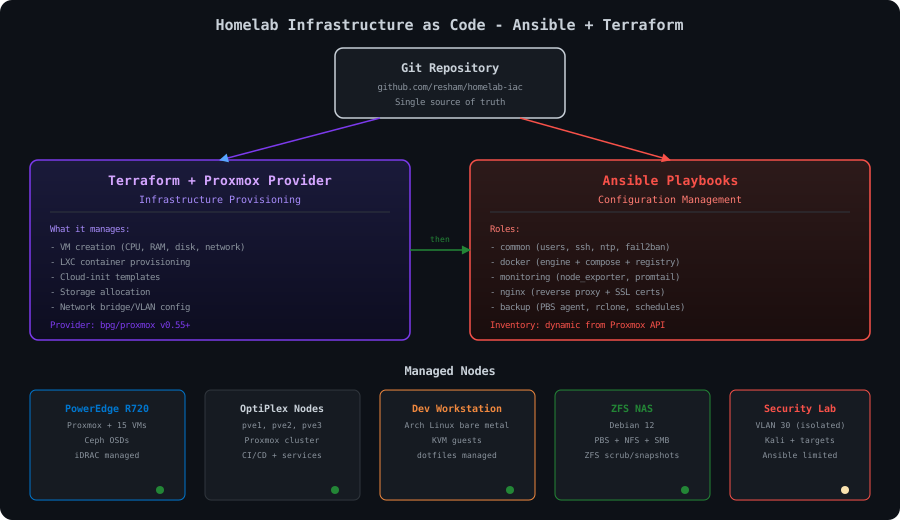
Ansible: The Configuration Layer
Inventory
The inventory file maps every machine in my homelab:
YAML46 lines1# ansible/inventory/hosts.yml 2all: 3 children: 4 proxmox_nodes: 5 hosts: 6 pve1: 7 ansible_host: 10.10.10.11 8 pve2: 9 ansible_host: 10.10.10.12 10 pve3: 11 ansible_host: 10.10.10.13 12 r720: 13 ansible_host: 10.10.10.14 14 15 nas: 16 hosts: 17 nas01: 18 ansible_host: 10.10.10.20 19 20 workstation: 21 hosts: 22 devbox: 23 ansible_host: 10.10.50.1 24 ansible_user: resham 25 26 vms: 27 children: 28 docker_hosts: 29 hosts: 30 docker-host: 31 ansible_host: 10.10.20.5 32 openclaw: 33 ansible_host: 10.10.20.10 34 services: 35 hosts: 36 nginx-proxy: 37 ansible_host: 10.10.20.2 38 gitea: 39 ansible_host: 10.10.20.3 40 jenkins: 41 ansible_host: 10.10.20.4 42 43 security_lab: 44 hosts: 45 kali: 46 ansible_host: 10.10.30.10
The Common Role
This role runs on every single machine. It's the baseline that I never want to configure manually again:
YAML43 lines1# ansible/roles/common/tasks/main.yml 2--- 3- name: Set timezone 4 timezone: 5 name: America/Chicago 6 7- name: Install base packages 8 package: 9 name: "{{ common_packages }}" 10 state: present 11 12- name: Configure SSH 13 template: 14 src: sshd_config.j2 15 dest: /etc/ssh/sshd_config 16 validate: "sshd -t -f %s" 17 notify: restart sshd 18 19- name: Deploy SSH authorized keys 20 authorized_key: 21 user: "{{ ansible_user | default('root') }}" 22 key: "{{ lookup('file', '~/.ssh/id_ed25519.pub') }}" 23 exclusive: true 24 25- name: Configure fail2ban 26 template: 27 src: jail.local.j2 28 dest: /etc/fail2ban/jail.local 29 notify: restart fail2ban 30 31- name: Configure NTP 32 template: 33 src: chrony.conf.j2 34 dest: "{{ chrony_config_path }}" 35 notify: restart chrony 36 37- name: Set up automatic security updates 38 include_tasks: "auto-updates-{{ ansible_os_family | lower }}.yml" 39 40- name: Install and configure node_exporter 41 include_role: 42 name: monitoring 43 tasks_from: node_exporter
YAML30 lines1# ansible/roles/common/vars/Debian.yml 2common_packages: 3 - curl 4 - wget 5 - vim 6 - htop 7 - tmux 8 - git 9 - jq 10 - unzip 11 - fail2ban 12 - chrony 13 - ufw 14 15chrony_config_path: /etc/chrony/chrony.conf 16 17# ansible/roles/common/vars/Archlinux.yml 18common_packages: 19 - curl 20 - wget 21 - vim 22 - htop 23 - tmux 24 - git 25 - jq 26 - unzip 27 - fail2ban 28 - chrony 29 30chrony_config_path: /etc/chrony.conf
The
validatesshd -tPermitRootLoginThe Docker Role
YAML49 lines1# ansible/roles/docker/tasks/main.yml 2--- 3- name: Install Docker prerequisites 4 apt: 5 name: 6 - ca-certificates 7 - curl 8 - gnupg 9 state: present 10 when: ansible_os_family == "Debian" 11 12- name: Add Docker GPG key 13 apt_key: 14 url: https://download.docker.com/linux/{{ ansible_distribution | lower }}/gpg 15 state: present 16 when: ansible_os_family == "Debian" 17 18- name: Add Docker repository 19 apt_repository: 20 repo: "deb https://download.docker.com/linux/{{ ansible_distribution | lower }} {{ ansible_distribution_release }} stable" 21 state: present 22 when: ansible_os_family == "Debian" 23 24- name: Install Docker 25 package: 26 name: 27 - docker-ce 28 - docker-ce-cli 29 - containerd.io 30 - docker-compose-plugin 31 state: present 32 33- name: Add user to docker group 34 user: 35 name: "{{ ansible_user | default('resham') }}" 36 groups: docker 37 append: true 38 39- name: Configure Docker daemon 40 template: 41 src: daemon.json.j2 42 dest: /etc/docker/daemon.json 43 notify: restart docker 44 45- name: Enable Docker service 46 systemd: 47 name: docker 48 enabled: true 49 state: started
JSON16 lines1// ansible/roles/docker/templates/daemon.json.j2 2{ 3 "log-driver": "json-file", 4 "log-opts": { 5 "max-size": "10m", 6 "max-file": "3" 7 }, 8 "default-address-pools": [ 9 { 10 "base": "172.17.0.0/16", 11 "size": 24 12 } 13 ], 14 "metrics-addr": "0.0.0.0:9323", 15 "experimental": true 16}
Secrets with Ansible Vault
All sensitive values (passwords, API keys, SSH keys) are encrypted with Ansible Vault:
Bash9 lines1# Create the vault 2ansible-vault create ansible/inventory/group_vars/all/vault.yml 3 4# Contents (encrypted at rest): 5vault_grafana_password: "my-strong-password" 6vault_postgres_password: "another-strong-password" 7vault_slack_webhook: "https://hooks.slack.com/..." 8vault_b2_app_key: "..." 9vault_idrac_password: "..."
Bash6 lines1# Run playbook with vault decryption 2ansible-playbook ansible/playbooks/site.yml --ask-vault-pass 3 4# Or use a password file (for automation) 5ansible-playbook ansible/playbooks/site.yml \ 6 --vault-password-file ~/.ansible-vault-password
Terraform: The Infrastructure Layer
Ansible configures machines that already exist. But who creates the VMs in the first place? That used to be me, clicking through the Proxmox web UI. Now it's Terraform.
I use the bpg/proxmox Terraform provider, which talks to the Proxmox API:
HCL20 lines1# terraform/provider.tf 2terraform { 3 required_providers { 4 proxmox = { 5 source = "bpg/proxmox" 6 version = ">= 0.55.0" 7 } 8 } 9} 10 11provider "proxmox" { 12 endpoint = "https://10.10.10.11:8006" 13 username = "terraform@pam" 14 password = var.proxmox_password 15 insecure = true # Self-signed cert on homelab 16 17 ssh { 18 agent = true 19 } 20}
Defining VMs as Code
HCL111 lines1# terraform/vms.tf 2 3# Cloud-init template (created once, used by all VMs) 4resource "proxmox_virtual_environment_file" "ubuntu_cloud_image" { 5 content_type = "iso" 6 datastore_id = "local" 7 node_name = "pve1" 8 9 source_file { 10 path = "https://cloud-images.ubuntu.com/noble/current/noble-server-cloudimg-amd64.img" 11 file_name = "ubuntu-24.04-cloud.img" 12 } 13} 14 15# Development VM 16resource "proxmox_virtual_environment_vm" "dev_ubuntu" { 17 name = "dev-ubuntu" 18 node_name = "r720" 19 vm_id = 104 20 21 agent { 22 enabled = true 23 } 24 25 cpu { 26 cores = 4 27 type = "host" 28 } 29 30 memory { 31 dedicated = 16384 32 } 33 34 disk { 35 datastore_id = "local-lvm" 36 size = 100 37 interface = "scsi0" 38 } 39 40 network_device { 41 bridge = "vmbr0" 42 vlan_id = 20 43 } 44 45 initialization { 46 ip_config { 47 ipv4 { 48 address = "10.10.20.5/24" 49 gateway = "10.10.20.1" 50 } 51 } 52 53 user_account { 54 username = "resham" 55 keys = [file("~/.ssh/id_ed25519.pub")] 56 } 57 } 58 59 clone { 60 vm_id = 9000 # Ubuntu 24.04 template 61 } 62 63 tags = ["docker", "development"] 64} 65 66# Jenkins VM 67resource "proxmox_virtual_environment_vm" "jenkins" { 68 name = "jenkins" 69 node_name = "pve2" 70 vm_id = 103 71 72 cpu { 73 cores = 4 74 type = "host" 75 } 76 77 memory { 78 dedicated = 4096 79 } 80 81 disk { 82 datastore_id = "local-lvm" 83 size = 50 84 interface = "scsi0" 85 } 86 87 network_device { 88 bridge = "vmbr0" 89 vlan_id = 20 90 } 91 92 initialization { 93 ip_config { 94 ipv4 { 95 address = "10.10.20.4/24" 96 gateway = "10.10.20.1" 97 } 98 } 99 100 user_account { 101 username = "resham" 102 keys = [file("~/.ssh/id_ed25519.pub")] 103 } 104 } 105 106 clone { 107 vm_id = 9000 108 } 109 110 tags = ["cicd", "services"] 111}
LXC Containers
HCL45 lines1# terraform/lxc.tf 2 3resource "proxmox_virtual_environment_container" "prometheus" { 4 description = "Prometheus monitoring server" 5 node_name = "pve1" 6 vm_id = 200 7 8 initialization { 9 hostname = "prometheus" 10 11 ip_config { 12 ipv4 { 13 address = "10.10.40.10/24" 14 gateway = "10.10.40.1" 15 } 16 } 17 } 18 19 cpu { 20 cores = 2 21 } 22 23 memory { 24 dedicated = 1024 25 swap = 0 26 } 27 28 disk { 29 datastore_id = "local-lvm" 30 size = 16 31 } 32 33 network_interface { 34 name = "eth0" 35 bridge = "vmbr0" 36 vlan_id = 40 37 } 38 39 operating_system { 40 template_file_id = "local:vztmpl/ubuntu-22.04-standard_22.04-1_amd64.tar.zst" 41 type = "ubuntu" 42 } 43 44 tags = ["monitoring"] 45}
The Deploy Script
The magic is in the deploy script that chains Terraform and Ansible together:
Bash33 lines1#!/bin/bash 2# scripts/deploy.sh 3set -euo pipefail 4 5echo "=== Homelab IaC Deploy ===" 6echo "Started at $(date)" 7 8# Step 1: Terraform — provision infrastructure 9echo "" 10echo "[1/3] Running Terraform..." 11cd terraform 12terraform init -upgrade 13terraform plan -out=plan.tfplan 14terraform apply plan.tfplan 15cd .. 16 17# Step 2: Wait for VMs to boot and be reachable 18echo "" 19echo "[2/3] Waiting for machines to be reachable..." 20ansible all -m ping --timeout 30 || { 21 echo "Some hosts unreachable. Waiting 30s and retrying..." 22 sleep 30 23 ansible all -m ping --timeout 30 24} 25 26# Step 3: Ansible — configure everything 27echo "" 28echo "[3/3] Running Ansible..." 29ansible-playbook ansible/playbooks/site.yml \ 30 --vault-password-file ~/.ansible-vault-password 31 32echo "" 33echo "=== Deploy complete at $(date) ==="
Bash39 lines1# Usage: 2resham@devbox:~/homelab-iac$ ./scripts/deploy.sh 3 4=== Homelab IaC Deploy === 5Started at Sun Jan 5 14:30:00 CST 2026 6 7[1/3] Running Terraform... 8proxmox_virtual_environment_vm.dev_ubuntu: Refreshing state... 9proxmox_virtual_environment_vm.jenkins: Refreshing state... 10# ... (no changes needed — all VMs already exist) 11 12Apply complete! Resources: 0 added, 0 changed, 0 destroyed. 13 14[2/3] Waiting for machines to be reachable... 15pve1 | SUCCESS 16pve2 | SUCCESS 17pve3 | SUCCESS 18r720 | SUCCESS 19nas01 | SUCCESS 20devbox | SUCCESS 21docker-host | SUCCESS 22# ... 23 24[3/3] Running Ansible... 25PLAY [all] ***** 26TASK [common : Set timezone] *** 27ok: [pve1] 28ok: [pve2] 29# ... (lots of "ok" because everything is already configured) 30 31PLAY RECAP ***** 32pve1 : ok=24 changed=0 unreachable=0 failed=0 33pve2 : ok=24 changed=0 unreachable=0 failed=0 34pve3 : ok=24 changed=0 unreachable=0 failed=0 35r720 : ok=24 changed=0 unreachable=0 failed=0 36nas01 : ok=18 changed=0 unreachable=0 failed=0 37devbox : ok=15 changed=0 unreachable=0 failed=0 38 39=== Deploy complete at Sun Jan 5 14:32:45 CST 2026 ===
Two minutes and 45 seconds to verify the entire homelab is in the desired state. Every machine, every package, every config file. And because Ansible is idempotent, running it when nothing has changed is essentially a no-op — it just verifies and moves on.
The Disaster Recovery Test
The real test of infrastructure as code is: can you rebuild everything from scratch?
I tested this by intentionally destroying a VM (the Docker host) and rebuilding it entirely through the IaC pipeline:
Bash12 lines1# Destroy the VM 2terraform destroy -target=proxmox_virtual_environment_vm.dev_ubuntu 3 4# Recreate it 5terraform apply 6 7# Configure it 8ansible-playbook ansible/playbooks/docker-hosts.yml \ 9 --limit docker-host \ 10 --vault-password-file ~/.ansible-vault-password 11 12# Time: 6 minutes 23 seconds from destroy to fully configured
Six minutes. From an empty VM to a fully configured Docker host with all services running. Before Ansible and Terraform, rebuilding this machine took me about three hours of manual configuration.
What I'd Add Next
1. GitOps workflow. Right now I run
deploy.shterraform planterraform apply + ansible-playbook2. Dynamic inventory. My Ansible inventory is static. The Proxmox API can generate inventory dynamically (list all VMs, their IPs, their tags), which would mean I never need to update the inventory file when I add a new VM.
3. Molecule testing. I want to test Ansible roles in CI before deploying them. Molecule can spin up Docker containers, run roles against them, and verify the result. Right now my testing is "run it and see if it breaks."
4. Vault integration. Ansible Vault is fine for a homelab, but HashiCorp Vault would give me dynamic secrets, auto-rotation, and audit logging. Overkill? Probably. But I want to learn it.
The Numbers
| Metric | Before IaC | After IaC |
|---|---|---|
| Time to update all machines | 2-3 hours (manual SSH) | 2 min 45 sec |
| Time to rebuild a VM | ~3 hours | ~6 minutes |
| Configuration drift | Constant (every machine slightly different) | Zero (Ansible enforces state) |
| "Did I update that machine?" uncertainty | Always | Never |
| Times I've been locked out by bad config | 3 | 0 (validate before deploy) |
| Hours spent on maintenance per month | ~8 hours | ~1 hour |
The ROI is absurd. I spent maybe 40 hours building the Ansible playbooks and Terraform configs. That investment saves me 7+ hours every month. It paid for itself in under six months, and now it's pure time savings.
If you're managing more than three machines manually, you need configuration management. It doesn't have to be Ansible — Chef, Puppet, Salt, and even shell scripts with a proper framework are all valid. But the core principle is the same: define your infrastructure in code, store it in git, and never configure anything by hand.
The Saturday I spent three hours updating node_exporter was the most expensive Saturday of my homelab career, measured in time wasted. The Sunday I spent setting up Ansible was the most productive. Every Saturday since then, my homelab takes care of itself while I do something I actually enjoy.
Like writing overly detailed blog posts about my homelab.