
I have a confession that might get me kicked out of the Proxmox subreddit: not everything in my homelab runs on Proxmox. One of my most important machines is a bare metal Arch Linux box sitting right below the OptiPlexes in the rack. No hypervisor layer. No web UI. Just Linux on hardware, the way Linus intended.
Before you tell me I'm doing it wrong — hear me out. There are very good reasons why a dedicated bare metal workstation makes sense even when you have a full virtualization cluster sitting right next to it.
The Machine
I built this one specifically as a development workstation. Unlike my Dell servers and OptiPlexes (all bought used), this is the one machine I spec'd from new parts:
| Component | Model | Cost |
|---|---|---|
| CPU | AMD Ryzen 5 5600G (6C/12T, 3.9GHz, Vega 7 iGPU) | $130 |
| RAM | 64GB DDR4-3200 (2x 32GB Crucial Ballistix) | $95 |
| SSD (boot) | 1TB Samsung 980 Pro NVMe | $80 |
| SSD (data) | 2TB Crucial P3 Plus NVMe | $100 |
| Case | Silverstone SG13 (Mini-ITX, fits in the rack) | $55 |
| Mobo | Gigabyte B550I AORUS PRO AX (Mini-ITX) | $130 |
| PSU | Corsair SF450 (SFX, 80+ Gold) | $70 |
| Total | $660 |
The Ryzen 5 5600G was a deliberate choice. The integrated Vega 7 GPU means I don't need a discrete graphics card for display output, which keeps power consumption low and lets me use a Mini-ITX case. For development work — running Docker containers, compiling code, managing VMs — the 5600G is more than enough. The 6 cores at 4.4GHz turbo handily outperform the older Xeons in my R720 for single-threaded tasks.
64GB of RAM might seem like overkill for a workstation, but when you're running Docker Compose stacks with 8-10 containers, a few KVM virtual machines, plus a browser with 40 tabs and VS Code... it fills up faster than you'd think.
Why Not Just Use a Proxmox VM?
Fair question. Here's my honest answer after trying both approaches:
1. Latency matters for interactive work. There's a perceptible difference between typing in a terminal on bare metal versus typing in a terminal inside a VM accessed over SPICE or VNC. It's maybe 5-10ms of added latency. You won't notice it for most tasks, but when you're in a flow state writing code for hours, that slight mushiness adds up. On bare metal, everything is instant. Keystrokes, file operations, compilation — there's no virtualization overhead between me and the hardware.
2. Docker-in-VM is a nesting headache. Running Docker inside a Proxmox VM works, but it's containers inside a VM inside a hypervisor. Networking gets weird, port forwarding requires more configuration, and debugging network issues means reasoning about three layers of abstraction. On bare metal, Docker talks directly to the kernel.
docker compose up3. GPU passthrough is a pain. I use the Vega 7 iGPU for occasional Wayland desktop sessions. GPU passthrough from Proxmox to a VM requires IOMMU groups, VFIO configuration, kernel parameters, and prayer. On bare metal, the GPU just works.
4. I want one machine that's always available regardless of cluster state. If my Proxmox cluster is down for maintenance, updates, or because I broke something (it happens), my workstation keeps running. It's my escape hatch.
The Arch Linux Setup
Yes, I run Arch. Yes, I've heard the jokes. No, I won't switch to Ubuntu for my daily driver. Here's why Arch works for a homelab workstation:
Bash9 lines1# My actual pacman stats 2resham@devbox:~$ pacman -Q | wc -l 3847 4 5resham@devbox:~$ uname -r 66.8.9-arch1-1 7 8resham@devbox:~$ uptime 9 14:23:18 up 47 days, 3:12, 4 users, load average: 1.23, 0.89, 0.74
Rolling release means latest everything. When a new kernel drops with better hardware support or performance improvements, I get it within days, not months. The 6.8 kernel brought significant improvements to the AMD scheduler that directly benefited my Ryzen 5600G.
AUR has literally everything. Need an obscure networking tool for a CTF challenge?
yay -S <package>pacman is blazingly fast. Coming from apt on Debian/Ubuntu, the speed difference is night and day. A full system update (
pacman -SyuThe desktop environment is minimal: Hyprland (Wayland compositor) with Alacritty (GPU-accelerated terminal), Neovim, and tmux. No GNOME, no KDE. Just fast, tiled windows.
Bash10 lines1# Key packages on my workstation 2resham@devbox:~$ pacman -Qe | grep -E "^(hyprland|alacritty|neovim|tmux|docker|qemu|libvirt)" 3alacritty 0.13.2-1 4docker 26.1.0-1 5docker-compose 2.27.0-1 6hyprland 0.40.0-3 7libvirt 10.3.0-1 8neovim 0.10.0-3 9qemu-full 9.0.0-1 10tmux 3.4-1
KVM/QEMU: The Bare Metal Hypervisor
Here's where it gets interesting. Even though this machine runs Linux bare metal, I still run virtual machines on it. The difference is I use KVM/QEMU with libvirt instead of Proxmox. KVM is built into the Linux kernel — it turns any Linux machine into a hypervisor with near-native performance and zero additional overhead.
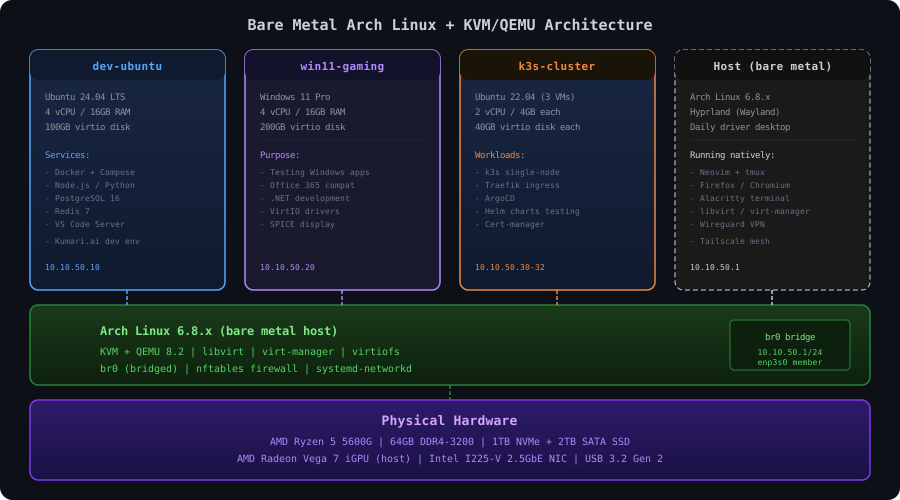
Setting Up KVM
Bash18 lines1# Install KVM and management tools 2sudo pacman -S qemu-full libvirt virt-manager dnsmasq bridge-utils 3 4# Enable and start libvirtd 5sudo systemctl enable --now libvirtd 6 7# Add yourself to the libvirt group 8sudo usermod -aG libvirt resham 9 10# Verify KVM is working 11resham@devbox:~$ kvm-ok 12INFO: /dev/kvm exists 13KVM acceleration can be used 14 15# Check loaded modules 16resham@devbox:~$ lsmod | grep kvm 17kvm_amd 167936 4 18kvm 1142784 1 kvm_amd
Network Bridge Setup
I set up a bridge interface so KVM guests get their own IPs on my homelab network:
Bash20 lines1# /etc/systemd/network/10-bridge.netdev 2[NetDev] 3Name=br0 4Kind=bridge 5 6# /etc/systemd/network/20-bind-enp3s0.network 7[Match] 8Name=enp3s0 9 10[Network] 11Bridge=br0 12 13# /etc/systemd/network/30-bridge.network 14[Match] 15Name=br0 16 17[Network] 18Address=10.10.50.1/24 19Gateway=10.10.10.1 20DNS=10.10.10.1
Bash7 lines1# Restart networking 2sudo systemctl restart systemd-networkd 3 4# Verify 5resham@devbox:~$ ip addr show br0 64: br0: <BROADCAST,MULTICAST,UP,LOWER_UP> mtu 1500 7 inet 10.10.50.1/24 brd 10.10.50.255 scope global br0
Now any KVM guest can use this bridge and appear as a first-class citizen on my network.
The VMs I Run
Bash8 lines1resham@devbox:~$ virsh list --all 2 Id Name State 3----------------------------------- 4 1 dev-ubuntu running 5 3 win11 running 6 - k3s-node1 shut off 7 - k3s-node2 shut off 8 - k3s-node3 shut off
dev-ubuntu (Ubuntu 24.04 LTS) — My primary development environment for Kumari.ai. Runs Docker Compose with the full backend stack: FastAPI, PostgreSQL, Redis, Nginx. I could run this directly on Arch, but isolating it in a VM means I can snapshot the entire development environment before risky changes:
Bash8 lines1# Create a snapshot before I do something dumb 2virsh snapshot-create-as dev-ubuntu "pre-refactor" \ 3 --description "Before the database migration refactor" 4 5# (inevitably breaks something) 6 7# Restore in 15 seconds 8virsh snapshot-revert dev-ubuntu "pre-refactor"
win11 (Windows 11 Pro) — For the rare occasions I need Windows. Testing cross-browser compatibility, running .NET tools, or joining a Teams call that doesn't work on Linux. I use VirtIO drivers for disk and network (massive performance improvement over the emulated defaults) and SPICE for display:
Bash12 lines1# Windows VM with VirtIO and SPICE 2virt-install \ 3 --name win11 \ 4 --ram 16384 \ 5 --vcpus 4 \ 6 --disk path=/var/lib/libvirt/images/win11.qcow2,size=200,bus=virtio \ 7 --network bridge=br0,model=virtio \ 8 --graphics spice \ 9 --video qxl \ 10 --os-variant win11 \ 11 --cdrom /home/resham/isos/Win11_23H2.iso \ 12 --disk path=/home/resham/isos/virtio-win.iso,device=cdrom
k3s cluster (3x Ubuntu 22.04) — A lightweight Kubernetes cluster for learning and testing. I keep these shut off unless I'm actively working with Kubernetes, since k3s on 3 VMs eats 12GB of RAM just idling.
Virtiofs: Shared Folders That Don't Suck
One thing I love about KVM on bare metal is virtiofs — a shared filesystem protocol that lets VMs access host directories with near-native performance. NFS and 9p are painfully slow in comparison.
XML6 lines1<!-- In the VM's libvirt XML config: --> 2<filesystem type="mount" accessmode="passthrough"> 3 <driver type="virtiofs"/> 4 <source dir="/home/resham/projects"/> 5 <target dir="hostprojects"/> 6</filesystem>
Inside the VM:
Bash5 lines1# Mount the shared folder 2sudo mount -t virtiofs hostprojects /mnt/projects 3 4# Or add to /etc/fstab for persistent mount: 5hostprojects /mnt/projects virtiofs defaults 0 0
I edit code on the host in Neovim, and the changes are instantly visible in the dev-ubuntu VM where Docker is running the application. No rsync, no git push/pull, no waiting. The file is just... there.
The Daily Workflow
Here's what a typical day looks like on this machine:
- Wake up, SSH into the machine from my laptop (or walk to the desk if I'm feeling motivated)
- tmux attach — all my sessions from yesterday are still running
- Write code in Neovim on the host, changes reflect instantly in the dev-ubuntu VM via virtiofs
- Run the Kumari.ai stack in the dev-ubuntu VM: CODE1 line
docker compose up - Test in Firefox on the host — the VM's web server is accessible via the bridge network
- If I need Kubernetes, fire up the k3s nodes: CODE1 line
for n in k3s-node{1..3}; do virsh start $n; done - SSH into the Proxmox cluster when I need to manage infrastructure
- Manage VMs via CLI or virt-manager GUI if I'm feeling lazyCODE1 line
virsh
The separation between "development" (bare metal workstation) and "infrastructure" (Proxmox cluster) is clean. I'm not competing for resources with production-like services. The workstation is mine — no shared hypervisor, no noisy neighbors.
Tailscale: Connecting Everything
One more piece that ties the workstation into the rest of the homelab: Tailscale. It creates a WireGuard mesh VPN between all my devices, so I can SSH into my workstation from anywhere:
Bash7 lines1# Install on Arch 2sudo pacman -S tailscale 3sudo systemctl enable --now tailscaled 4tailscale up 5 6# Now I can SSH from my phone, laptop, or literally anywhere: 7ssh resham@devbox # Tailscale MagicDNS resolves the hostname
Tailscale also lets me access the Proxmox web UI, Grafana dashboards, and any service running on my homelab network — even from a coffee shop. No port forwarding, no Cloudflare Tunnel for internal services.
Power and Noise
This is the quietest machine in my rack:
CODE6 lines1Idle: ~35W (Ryzen 5600G is very efficient) 2Development: ~55W (Docker + VMs + browser) 3Heavy compile: ~85W (all 12 threads pegged) 4 5Noise: Essentially silent — the Noctua L9a cooler 6 is inaudible over the room's ambient noise
Compare that to the R720's 120-186W, and you understand why some workloads make more sense on efficient consumer hardware.
What I'd Change
If I were building this today, I'd go with the Ryzen 7 5700G instead. Same socket, 8 cores instead of 6, and the prices have dropped to nearly the same. The extra 2 cores would help with running more simultaneous VMs.
I'd also bump the NVMe to 2TB for the boot drive. 1TB fills up faster than expected when you're storing VM disk images, Docker images, and development data. The second 2TB SATA SSD was an afterthought — should have been the primary from the start.
But honestly? This machine has been rock solid for over a year. Arch has been stable (yes, really), KVM performs flawlessly, and the separation between dev workstation and infrastructure cluster has made my workflow significantly more productive.
Not every machine needs to be virtualized. Sometimes the best tool is a simple Linux box where you have direct access to the hardware, instant performance, and the freedom to break things without affecting anyone else. If you already have a homelab cluster but find yourself frustrated with VM-based development, try adding a bare metal workstation. It might become your favorite machine in the rack.