
I Self-Hosted OpenClaw on My Proxmox Homelab — Here's Everything I Learned
I started with Claude API for my AI agent integrations, hit the billing wall hard, and eventually migrated to a fully self-hosted Ollama stack on Proxmox. This is the honest story of that transition — the setup, the performance trade-offs, and why I still keep Claude as a fallback for the tasks that actually need it.
I'll be honest with you — I'm a little obsessed with self-hosting things. If there's an open-source alternative to a SaaS product I use, I've probably tried to run it on my homelab at some point. Pi-hole, Gitea, Nextcloud, Uptime Kuma, Grafana — they've all had a home on my Proxmox cluster at various points.
So when I started building Kumari.ai — my AI agent platform — the obvious first step was wiring everything up to the Claude API. And honestly? It was a great experience.
claude-3-sonnetThen I got my first month's API bill.
$80. For my own development and testing. Not production traffic. Not paying users. Just me hammering the API while figuring out how agents should chain together. I did the math — at the rate I was iterating, I was looking at $150-200/month before the project even had a single user. That's when I started seriously looking for alternatives.
I tried OpenAI for a bit (similar story), then Groq (fast but still API-based), and eventually landed on OpenClaw with Ollama for the bulk of my dev work. The idea: run local models for 90% of the iteration and testing, keep Claude and Groq as fallbacks for the tasks that genuinely need frontier-model quality. Best of both worlds.
This post is the full story of that migration — how I set up the self-hosted stack on Proxmox, what the performance trade-offs actually look like, and why Claude still has a spot in the config even after all this.
Why Bother Self-Hosting? (And Why I Didn't Start Here)
A fair question — especially since I had working Claude and Groq integrations already. Let me be honest about the full picture, not just the "cloud bad, self-host good" narrative.
The Claude API is genuinely good. I want to say this clearly. When I first wired Kumari.ai into
claude-3-sonnetBut the cost model breaks for development. The issue isn't production traffic — it's the 500 test calls you make figuring out the right prompt structure for an agent. At $3/million input tokens (Sonnet), those experiments add up. Local Ollama is $0/million tokens. For iteration speed during development, that's a huge deal.
Privacy at the edges. When I'm sketching out Kumari.ai's agent architecture, the prompts contain ideas I'm genuinely not ready to share. Local inference is a clean answer — nothing leaves the machine. I'm not paranoid about Anthropic specifically (their privacy policy is reasonable), but the habit of routing sensitive design decisions through external APIs felt sloppy.
Learning the infrastructure. There's a big difference between using an LLM API and understanding how inference actually works. After setting up Ollama, I understand model quantization, context length trade-offs, memory requirements, and batching in a way that makes me significantly better at designing systems around LLMs. That depth directly feeds back into Kumari.ai.
It's genuinely fun. Watching my $120 Dell OptiPlex generate coherent text at 18 tokens per second from a completely local model is one of the most satisfying things I've done in my homelab. No API key. No usage dashboard. Just silicon doing math.
The Migration: From Claude API to Ollama (And What I Kept)
Before the setup steps, here's how the actual transition went — because it wasn't a clean "rip out Claude, plug in Ollama" swap.
Phase 1 — Claude only. Every call in my early Kumari.ai prototype went to
claude-3-sonnetPhase 2 — Groq as the primary, Claude as fallback. Groq runs llama3-70b on custom LPU hardware and returns responses in under a second. For quick tasks — classification, formatting, short summaries — it was a direct swap with zero quality loss. I routed anything needing deep reasoning or large context to Claude. Monthly cost dropped to ~$35.
Phase 3 — Ollama for dev, APIs for production. This is where OpenClaw came in. I set up Ollama locally to handle all development and testing. Production traffic that needed quality still went to Groq or Claude, but the hundreds of daily test calls during development became free. Monthly cost: ~$12 (just production traffic).
Phase 4 — Current state. Ollama handles ~70% of total calls (mostly dev, some lighter production tasks). Groq handles ~25% (fast production tasks where llama3-70b is sufficient). Claude handles ~5% — complex reasoning, nuanced agent behavior, anything where the output quality genuinely matters and a smaller model won't cut it.
Here's what my OpenClaw provider config looks like today:
YAML39 lines1# Provider routing in OpenClaw config 2providers: 3 - name: local-ollama 4 type: ollama 5 base_url: http://ollama:11434 6 priority: 1 # First choice 7 models: 8 - llama3:8b # Fast, everyday tasks 9 - mistral:7b # Quick queries 10 - codellama:13b # Code generation 11 - deepseek-r1:7b # Reasoning tasks 12 13 - name: groq-cloud 14 type: openai_compatible 15 base_url: https://api.groq.com/openai/v1 16 api_key: ${GROQ_API_KEY} 17 priority: 2 # Fallback for speed-sensitive tasks 18 models: 19 - llama3-70b-8192 # Fast, high quality 20 - mixtral-8x7b # Good for multi-step reasoning 21 22 - name: anthropic-claude 23 type: anthropic 24 api_key: ${CLAUDE_API_KEY} 25 priority: 3 # Reserved for complex tasks 26 models: 27 - claude-3-sonnet-20240229 # Main workhorse 28 - claude-3-haiku-20240307 # Fast Claude for lighter tasks 29 30# Routing rules 31routing: 32 default: local-ollama 33 rules: 34 - condition: "task.requires_large_context" 35 provider: anthropic-claude 36 - condition: "task.type == 'code_review' AND task.complexity > 7" 37 provider: anthropic-claude 38 - condition: "task.latency_sensitive" 39 provider: groq-cloud
This tiered approach is honestly the most practical setup for anyone building seriously with LLMs. Use local inference for the long tail of cheap tasks, use fast cloud inference for latency-sensitive production tasks, and keep the frontier model for the 5% that actually needs it. Your bill will thank you.
The Architecture
Here's the full picture of what we're building:

The key design decisions:
- OpenClaw runs as a Docker container inside a dedicated Proxmox VM
- Ollama runs alongside it in a separate container, serving models locally
- Nginx handles SSL termination and reverse proxying
- Cloudflare Tunnel gives me HTTPS access from anywhere without opening ports on my router
- PostgreSQL persists conversation history and session data
- External APIs (Claude, OpenAI, Groq) are configured as fallbacks for tasks that need more horsepower
Setting Up the Proxmox VM
I created a dedicated VM for OpenClaw rather than running it on my existing Docker host. The reason is isolation — I can snapshot it, migrate it, and experiment without worrying about affecting other services.
Here's the VM spec I settled on after some trial and error:
CODE8 lines1VM ID: 105 2Name: openclaw 3Node: pve1 4OS: Ubuntu 22.04.3 LTS (cloud-init image) 5CPU: 4 vCPU (host passthrough for AVX2 support) 6RAM: 8 GB 7Disk: 80 GB (local-lvm thin) 8Network: VLAN 20 (10.10.20.10)
Creating the VM from the command line (I keep a script for this):
Bash43 lines1#!/bin/bash 2# create-openclaw-vm.sh 3 4VMID=105 5NODE="pve1" 6CLOUDINIT_IMG="/var/lib/vz/template/iso/ubuntu-22.04-cloudimg-amd64.img" 7 8# Create VM 9qm create $VMID \ 10 --name openclaw \ 11 --node $NODE \ 12 --memory 8192 \ 13 --cores 4 \ 14 --cpu host \ 15 --net0 virtio,bridge=vmbr0,tag=20 \ 16 --scsihw virtio-scsi-single \ 17 --onboot 1 \ 18 --agent enabled=1 19 20# Import cloud-init disk 21qm importdisk $VMID $CLOUDINIT_IMG local-lvm 22 23# Attach and resize disk 24qm set $VMID --scsi0 local-lvm:vm-${VMID}-disk-0 25qm resize $VMID scsi0 80G 26 27# Cloud-init drive 28qm set $VMID \ 29 --ide2 local-lvm:cloudinit \ 30 --boot order=scsi0 \ 31 --serial0 socket \ 32 --vga serial0 33 34# Set cloud-init config 35qm set $VMID \ 36 --ciuser resham \ 37 --cipassword "$(openssl passwd -6 "$VM_PASSWORD")" \ 38 --ipconfig0 ip=10.10.20.10/24,gw=10.10.20.1 \ 39 --nameserver 10.10.20.1 \ 40 --sshkeys ~/.ssh/id_ed25519.pub 41 42qm start $VMID 43echo "VM $VMID started. SSH: ssh resham@10.10.20.10"
Once the VM is up, SSH in and run the initial setup:
Bash14 lines1ssh resham@10.10.20.10 2 3# System updates 4sudo apt update && sudo apt full-upgrade -y 5 6# Install Docker 7curl -fsSL https://get.docker.com | sudo bash 8sudo usermod -aG docker resham 9 10# Install Docker Compose plugin 11sudo apt install -y docker-compose-plugin 12 13# Log out and back in for group changes 14exit
The Docker Compose Setup
Here's the full
docker-compose.ymlYAML79 lines1# ~/openclaw-deploy/docker-compose.yml 2version: '3.8' 3 4services: 5 openclaw: 6 image: openclaw/openclaw:latest 7 container_name: openclaw-app 8 restart: unless-stopped 9 ports: 10 - "3000:3000" 11 environment: 12 - DATABASE_URL=postgresql://openclaw:${POSTGRES_PASSWORD}@postgres:5432/openclaw 13 - OLLAMA_BASE_URL=http://ollama:11434 14 - DEFAULT_PROVIDER=ollama 15 - DEFAULT_MODEL=llama3:8b 16 - CLAUDE_API_KEY=${CLAUDE_API_KEY} 17 - OPENAI_API_KEY=${OPENAI_API_KEY} 18 - GROQ_API_KEY=${GROQ_API_KEY} 19 - SECRET_KEY=${SECRET_KEY} 20 - ENABLE_SIGNUP=false 21 - WEBUI_NAME="Resham's AI" 22 depends_on: 23 postgres: 24 condition: service_healthy 25 ollama: 26 condition: service_started 27 volumes: 28 - openclaw_data:/app/backend/data 29 networks: 30 - openclaw_net 31 32 ollama: 33 image: ollama/ollama:latest 34 container_name: openclaw-ollama 35 restart: unless-stopped 36 ports: 37 - "11434:11434" 38 volumes: 39 - ollama_models:/root/.ollama 40 environment: 41 - OLLAMA_NUM_PARALLEL=2 42 - OLLAMA_MAX_LOADED_MODELS=2 43 networks: 44 - openclaw_net 45 # Uncomment if you have a GPU: 46 # deploy: 47 # resources: 48 # reservations: 49 # devices: 50 # - driver: nvidia 51 # count: 1 52 # capabilities: [gpu] 53 54 postgres: 55 image: postgres:16-alpine 56 container_name: openclaw-postgres 57 restart: unless-stopped 58 environment: 59 - POSTGRES_USER=openclaw 60 - POSTGRES_PASSWORD=${POSTGRES_PASSWORD} 61 - POSTGRES_DB=openclaw 62 volumes: 63 - postgres_data:/var/lib/postgresql/data 64 networks: 65 - openclaw_net 66 healthcheck: 67 test: ["CMD-SHELL", "pg_isready -U openclaw"] 68 interval: 10s 69 timeout: 5s 70 retries: 5 71 72volumes: 73 openclaw_data: 74 ollama_models: 75 postgres_data: 76 77networks: 78 openclaw_net: 79 driver: bridge
And the
.envBash6 lines1# ~/openclaw-deploy/.env 2POSTGRES_PASSWORD=your_strong_password_here 3SECRET_KEY=$(openssl rand -hex 32) 4CLAUDE_API_KEY=sk-ant-... 5OPENAI_API_KEY=sk-... 6GROQ_API_KEY=gsk_...
Start everything up:
Bash2 lines1cd ~/openclaw-deploy 2docker compose up -d
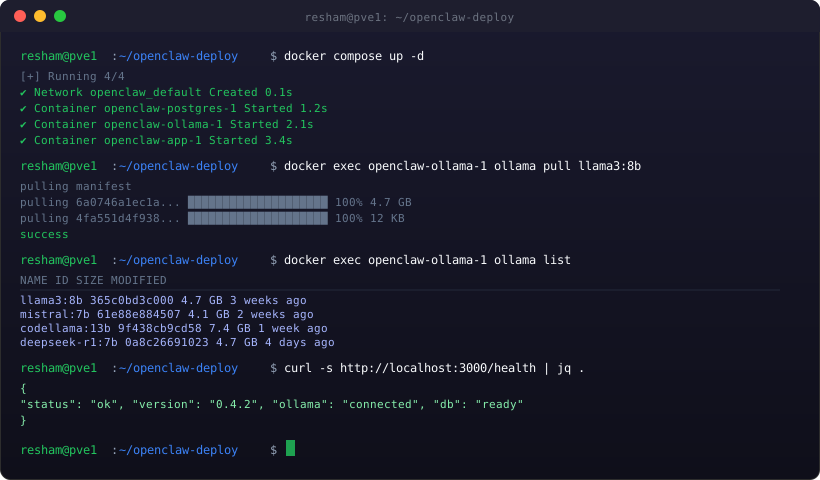
Watch the containers come up, then pull the models:
Bash8 lines1# Pull models (this takes a while — get a coffee) 2docker exec openclaw-ollama ollama pull llama3:8b 3docker exec openclaw-ollama ollama pull mistral:7b 4docker exec openclaw-ollama ollama pull codellama:13b 5docker exec openclaw-ollama ollama pull deepseek-r1:7b 6 7# Verify everything is up 8docker exec openclaw-ollama ollama list
The first model pull will take a while depending on your internet speed. llama3:8b is 4.7GB, codellama:13b is 7.4GB. Go do something else. When you come back, you should see all models listed.
Pulling in the models took longer than I expected
I'll be transparent about one thing: the first time I pulled codellama:13b, it failed halfway through with a disk write error. Turns out I hadn't allocated enough disk space on the
ollama_models- Stop the containers
- Resize the Proxmox VM disk: CODE1 line
qm resize 105 scsi0 +20G - Resize the partition inside the VM: CODE1 line
sudo growpart /dev/sda 1 && sudo resize2fs /dev/sda1 - Restart and re-pull
Not a big deal once you know what happened, but it cost me 45 minutes of confused troubleshooting. The lesson: allocate more disk than you think you need upfront. Models are big.
Nginx Reverse Proxy with SSL
I use a wildcard SSL cert from Let's Encrypt for all my homelab services, managed by a Certbot container on my Nginx VM. Here's the OpenClaw Nginx config:
NGINX52 lines1# /etc/nginx/conf.d/openclaw.conf 2 3upstream openclaw_backend { 4 server 10.10.20.10:3000; 5 keepalive 32; 6} 7 8# HTTP → HTTPS redirect 9server { 10 listen 80; 11 server_name ai.homelab.local ai.reshamk.com; 12 return 301 https://$host$request_uri; 13} 14 15server { 16 listen 443 ssl http2; 17 server_name ai.homelab.local ai.reshamk.com; 18 19 ssl_certificate /etc/letsencrypt/live/reshamk.com/fullchain.pem; 20 ssl_certificate_key /etc/letsencrypt/live/reshamk.com/privkey.pem; 21 ssl_protocols TLSv1.2 TLSv1.3; 22 ssl_ciphers ECDHE-ECDSA-AES256-GCM-SHA384:ECDHE-RSA-AES256-GCM-SHA384; 23 24 # Larger body size for file uploads to the agent 25 client_max_body_size 50M; 26 27 # WebSocket support (OpenClaw uses WS for streaming responses) 28 location / { 29 proxy_pass http://openclaw_backend; 30 proxy_http_version 1.1; 31 proxy_set_header Upgrade $http_upgrade; 32 proxy_set_header Connection "upgrade"; 33 proxy_set_header Host $host; 34 proxy_set_header X-Real-IP $remote_addr; 35 proxy_set_header X-Forwarded-For $proxy_add_x_forwarded_for; 36 proxy_set_header X-Forwarded-Proto $scheme; 37 38 # Streaming timeouts — important for LLM responses 39 proxy_read_timeout 300s; 40 proxy_send_timeout 300s; 41 proxy_connect_timeout 10s; 42 } 43 44 # Rate limiting on the API endpoint 45 location /api/ { 46 limit_req zone=api_limit burst=20 nodelay; 47 proxy_pass http://openclaw_backend; 48 proxy_http_version 1.1; 49 proxy_set_header Host $host; 50 proxy_set_header X-Real-IP $remote_addr; 51 } 52}
Cloudflare Tunnel: Public Access Without Port Forwarding
My ISP doesn't give me a static IP and I'm on a shared network where port forwarding is a pain. Cloudflare Tunnel solves this beautifully — you install a lightweight
cloudflaredInstalling
cloudflaredBash29 lines1# Install cloudflared 2curl -L https://github.com/cloudflare/cloudflared/releases/latest/download/cloudflared-linux-amd64.deb \ 3 -o cloudflared.deb 4sudo dpkg -i cloudflared.deb 5 6# Authenticate with Cloudflare 7cloudflared tunnel login 8 9# Create the tunnel 10cloudflared tunnel create openclaw 11 12# Create DNS record 13cloudflared tunnel route dns openclaw ai.reshamk.com 14 15# Configure the tunnel 16mkdir -p ~/.cloudflared 17cat > ~/.cloudflared/config.yml << EOF 18tunnel: <your-tunnel-id> 19credentials-file: /home/resham/.cloudflared/<tunnel-id>.json 20 21ingress: 22 - hostname: ai.reshamk.com 23 service: http://localhost:3000 24 - service: http_status:404 25EOF 26 27# Install as a systemd service 28sudo cloudflared service install 29sudo systemctl enable --now cloudflared
That's it. Within a few seconds,
https://ai.reshamk.comReal Performance on CPU-Only Inference
No GPU on my OptiPlexes. Everything runs on CPU. Here's what the real-world numbers look like after a few months of use:
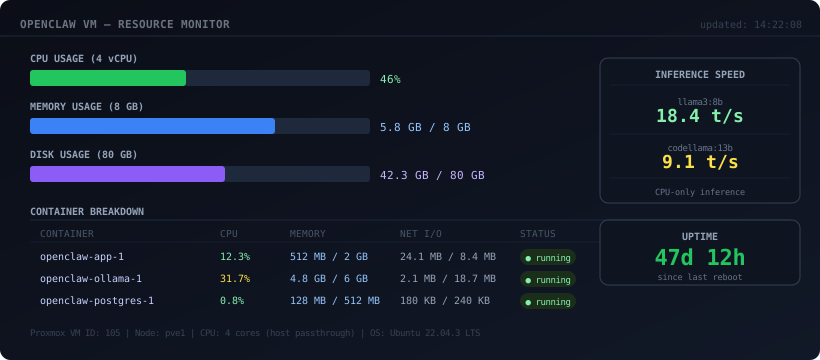
The actual inference speeds on my i5-7500:
| Model | Size | Tokens/sec | First token latency | Good for |
|---|---|---|---|---|
| llama3:8b | 4.7 GB | ~18 t/s | ~1.2s | General chat, quick Q&A |
| mistral:7b | 4.1 GB | ~20 t/s | ~1.0s | Fast responses, coding help |
| codellama:13b | 7.4 GB | ~9 t/s | ~2.5s | Detailed code generation |
| deepseek-r1:7b | 4.7 GB | ~17 t/s | ~1.5s | Reasoning, step-by-step problems |
18 tokens/second for llama3:8b means a 200-word response takes about 11 seconds. That's not blazing fast, but it's genuinely usable for most tasks. For anything time-sensitive, I route to Groq (which runs llama3-70b at ~300 t/s via their LPU hardware). The model switching in OpenClaw makes this seamless — I just pick the model from a dropdown and the response speed changes accordingly.
The Killer Feature: Agent Tasks
The part that initially attracted me to OpenClaw over something like plain Ollama + Open WebUI is the autonomous agent functionality. I can give it a task like "research the latest trends in LLM agent architectures and summarize the top 5 papers from the last 3 months" and it'll autonomously browse the web, read papers, and synthesize a summary — without me holding its hand through each step.
I wired it up to a few integrations for my workflow:
YAML20 lines1# OpenClaw agent config (simplified) 2integrations: 3 - type: web_search 4 provider: searxng 5 url: http://10.10.20.15:8080 # Self-hosted SearXNG instance 6 7 - type: code_execution 8 provider: docker 9 image: python:3.12-slim 10 timeout: 30s 11 12 - type: file_access 13 paths: 14 - /home/resham/notes 15 - /home/resham/projects/kumari-ai/docs 16 17 - type: slack 18 webhook_url: ${SLACK_WEBHOOK_URL} 19 channels: 20 - "#personal-assistant"
What I Actually Use It For
After a few months, here's how OpenClaw has actually become part of my daily workflow:
Code review and rubber ducking. I paste code and ask it to critique it, suggest improvements, or explain what a function does. codellama:13b is surprisingly good at this for a 13B parameter model.
Research synthesis. When I'm reading about a new technology for Kumari.ai, I'll ask it to compare a few approaches and summarize the trade-offs. It uses the web search integration to pull current information rather than relying on training data.
Learning security concepts. As a cybersecurity student, I use it to explain vulnerability concepts, walk through CVE analyses, and help me understand attack patterns. Having this run locally means I can ask about sensitive topics (specific exploit techniques, malware behavior) without those queries going to an external API.
Generating boilerplate. Kubernetes YAML, Nginx configs, GitHub Actions workflows — anything repetitive that has a clear structure. I describe what I want and let it generate the first draft.
The One Thing That Annoyed Me
OpenClaw's model switching is seamless, but I kept running into an issue where the ollama container would silently run out of VRAM (well, RAM in my case) when I had both llama3:8b and codellama:13b loaded simultaneously. The container would just... silently fail and return empty responses.
The fix was setting two environment variables in the Ollama container:
Bash2 lines1OLLAMA_MAX_LOADED_MODELS=2 # Max simultaneous loaded models 2OLLAMA_NUM_PARALLEL=2 # Max parallel inference requests
And making sure the container had enough memory allocated. I bumped the Proxmox VM from 6GB to 8GB RAM, and since then it's been solid.
Monitoring: Know Before It Breaks
I added OpenClaw to my existing monitoring stack — Prometheus + Grafana on VLAN 40, Uptime Kuma for availability checks:
Bash10 lines1# Add to prometheus.yml scrape configs 2- job_name: 'openclaw' 3 static_configs: 4 - targets: ['10.10.20.10:3000'] 5 metrics_path: /metrics 6 7- job_name: 'ollama' 8 static_configs: 9 - targets: ['10.10.20.10:11434'] 10 metrics_path: /api/metrics
The Grafana dashboard I built tracks:
- Response time per model — helps me notice when inference is degrading
- Requests per hour — useful for understanding my own usage patterns
- Container RAM usage — the most important metric; if ollama is approaching its memory limit, it starts evicting models and performance tanks
- Uptime — Uptime Kuma pings every 60 seconds and sends me a Slack message if it goes downCODE1 line
/health
The monitoring paid for itself in the first week. I noticed that response times were spiking to 45+ seconds late at night even for simple queries. Turned out my Proxmox backup job was running at 2am and hammering the disk, starving the ollama container of I/O. Moving the backup job to 4am when I'm definitely not using the AI fixed it.
Automating the Setup for the Next Time
After going through this setup once, I turned the whole thing into an Ansible playbook so I can reproduce it in minutes:
YAML30 lines1# roles/openclaw/tasks/main.yml 2- name: Create openclaw directory 3 file: 4 path: "{{ openclaw_dir }}" 5 state: directory 6 owner: "{{ ansible_user }}" 7 8- name: Deploy docker-compose.yml 9 template: 10 src: docker-compose.yml.j2 11 dest: "{{ openclaw_dir }}/docker-compose.yml" 12 13- name: Deploy .env file 14 template: 15 src: env.j2 16 dest: "{{ openclaw_dir }}/.env" 17 mode: '0600' 18 19- name: Start OpenClaw stack 20 community.docker.docker_compose_v2: 21 project_src: "{{ openclaw_dir }}" 22 state: present 23 24- name: Pull default models 25 community.docker.docker_container_exec: 26 container: openclaw-ollama 27 command: "ollama pull {{ item }}" 28 loop: "{{ openclaw_models }}" 29 async: 600 30 poll: 30
With this playbook, setting up a fresh instance goes from two hours of manual commands to about 20 minutes, mostly spent waiting for model downloads.
Is It Worth It?
Three months in, the honest answer is: absolutely yes, with caveats.
The wins:
- Zero API costs for local models
- Complete privacy for anything sensitive
- Learned a ton about LLM inference and agent architecture
- Available even when my internet goes down (local AI is surprisingly useful)
- Satisfying in a way that purely cloud-based tools aren't
The caveats:
- CPU-only inference is slow for large models. If you want GPT-4 tier quality at scale, you need a GPU or cloud APIs
- Maintenance overhead is real. I've spent maybe 4-5 hours total on upkeep over three months — mostly on Ollama updates and the occasional container restart
- Model quality at the 7B-13B scale is noticeably below GPT-4 or Claude for complex reasoning. I use external API fallbacks for anything that requires serious thinking
If you're building AI applications, running a local stack like this is invaluable for development. You can experiment freely, understand the infrastructure deeply, and build intuition for how LLM systems actually work. That's been directly useful for my work on Kumari.ai.
And if you're a student or early-career engineer looking to stand out — having a self-hosted AI agent running on your homelab infrastructure is a great conversation piece in any interview. It shows you understand the whole stack, from the VM and network configuration to the inference engine to the reverse proxy and monitoring. Not many people can say they've done that.
If you're thinking about replicating this setup, feel free to reach out. I'm happy to share the Ansible playbooks or troubleshoot any of the steps above. The OpenClaw community Discord is also genuinely helpful — much better signal-to-noise ratio than most tech communities I've been part of.
Now if you'll excuse me, I need to go ask codellama to review the FastAPI endpoint I just wrote.