
How I Built a Zero-Downtime CI/CD Pipeline with Jenkins, Docker, and Nginx
A detailed walkthrough of building a production CI/CD pipeline with blue-green deployments, automated rollbacks, and zero downtime — from someone who learned the hard way after a Friday deploy took down the app for 40 minutes.
I still remember the Friday evening when I pushed a "small fix" directly to production. The app went down. For 40 minutes. On a Friday. My phone was blowing up with alerts and I was frantically SSH-ing into the server trying to figure out what went wrong. Turns out, the new container started before the old one fully stopped, there was a port conflict, and Nginx was routing traffic to a dead upstream.
That night I decided: never again. I was going to build a proper CI/CD pipeline with zero-downtime deployments, automated health checks, and instant rollbacks. This post is the result of about three weeks of iterations, late nights, and a lot of
docker logsThe Architecture
Before diving into the setup, here's the high-level view of what we're building:
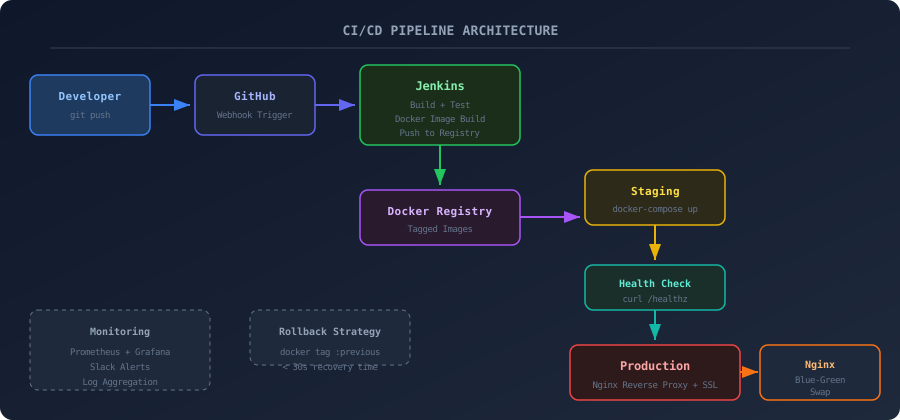
The flow is straightforward: push to GitHub, Jenkins picks it up via webhook, builds a Docker image, runs tests, pushes to a registry, deploys to staging, runs health checks, and if everything passes — swaps traffic to the new container using Nginx. If anything fails, we roll back automatically.
The Stack
Here's what I'm working with:
| Component | Tool | Why |
|---|---|---|
| CI Server | Jenkins (self-hosted) | Free, extensible, I already had it running on my homelab |
| Containerization | Docker + Docker Compose | Consistent environments, easy rollbacks |
| Reverse Proxy | Nginx | Blue-green traffic switching, SSL termination |
| Source Control | GitHub | Webhook triggers on push |
| Monitoring | Prometheus + Grafana | Need to know when things break before users tell me |
| Notifications | Slack webhook | Because I check Slack more than email |
Setting Up Jenkins with Docker
I run Jenkins itself inside a Docker container on my Proxmox homelab. Here's the compose file:
YAML25 lines1# docker-compose.jenkins.yml 2version: '3.8' 3 4services: 5 jenkins: 6 image: jenkins/jenkins:lts 7 container_name: jenkins 8 restart: unless-stopped 9 ports: 10 - "8080:8080" 11 - "50000:50000" 12 volumes: 13 - jenkins_home:/var/jenkins_home 14 - /var/run/docker.sock:/var/run/docker.sock 15 environment: 16 - JAVA_OPTS=-Xmx512m 17 networks: 18 - cicd 19 20volumes: 21 jenkins_home: 22 23networks: 24 cicd: 25 driver: bridge
After starting Jenkins, I installed these plugins:
- Docker Pipeline
- GitHub Integration
- Slack Notification
- Blue Ocean (for the nice UI)
The Jenkinsfile
This is where most of the magic happens. I went through probably 15 revisions of this file before I was happy with it:
GROOVY112 lines1pipeline { 2 agent any 3 4 environment { 5 DOCKER_REGISTRY = 'registry.homelab.local:5000' 6 APP_NAME = 'myapp' 7 SLACK_CHANNEL = '#deployments' 8 } 9 10 stages { 11 stage('Checkout') { 12 steps { 13 checkout scm 14 script { 15 env.GIT_COMMIT_SHORT = sh( 16 script: 'git rev-parse --short HEAD', 17 returnStdout: true 18 ).trim() 19 env.IMAGE_TAG = "${env.APP_NAME}:${env.GIT_COMMIT_SHORT}" 20 } 21 } 22 } 23 24 stage('Build') { 25 steps { 26 sh """ 27 docker build \ 28 --build-arg BUILD_DATE=\$(date -u +'%Y-%m-%dT%H:%M:%SZ') \ 29 --build-arg VCS_REF=${env.GIT_COMMIT_SHORT} \ 30 -t ${env.DOCKER_REGISTRY}/${env.IMAGE_TAG} \ 31 -t ${env.DOCKER_REGISTRY}/${env.APP_NAME}:latest \ 32 . 33 """ 34 } 35 } 36 37 stage('Test') { 38 steps { 39 sh """ 40 docker run --rm \ 41 ${env.DOCKER_REGISTRY}/${env.IMAGE_TAG} \ 42 python -m pytest tests/ -v --tb=short 43 """ 44 } 45 } 46 47 stage('Push') { 48 steps { 49 sh """ 50 docker push ${env.DOCKER_REGISTRY}/${env.IMAGE_TAG} 51 docker push ${env.DOCKER_REGISTRY}/${env.APP_NAME}:latest 52 """ 53 } 54 } 55 56 stage('Deploy to Staging') { 57 steps { 58 sh './scripts/deploy.sh staging ${IMAGE_TAG}' 59 } 60 } 61 62 stage('Health Check') { 63 steps { 64 script { 65 def healthy = false 66 for (int i = 0; i < 10; i++) { 67 def status = sh( 68 script: 'curl -s -o /dev/null -w "%{http_code}" http://staging.homelab.local/healthz', 69 returnStdout: true 70 ).trim() 71 if (status == '200') { 72 healthy = true 73 break 74 } 75 sleep(time: 3, unit: 'SECONDS') 76 } 77 if (!healthy) { 78 error('Health check failed after 30 seconds') 79 } 80 } 81 } 82 } 83 84 stage('Deploy to Production') { 85 when { 86 branch 'main' 87 } 88 steps { 89 sh './scripts/deploy.sh production ${IMAGE_TAG}' 90 sh './scripts/blue-green-swap.sh' 91 } 92 } 93 } 94 95 post { 96 success { 97 slackSend( 98 channel: env.SLACK_CHANNEL, 99 color: 'good', 100 message: "Deployed ${env.IMAGE_TAG} to production" 101 ) 102 } 103 failure { 104 sh './scripts/rollback.sh' 105 slackSend( 106 channel: env.SLACK_CHANNEL, 107 color: 'danger', 108 message: "Deploy FAILED for ${env.IMAGE_TAG} — rolled back" 109 ) 110 } 111 } 112}
The Blue-Green Deployment Script
This was the trickiest part to get right. The idea is simple: run two copies of your app (blue and green), and swap Nginx's upstream to point at whichever one has the new code. Here's the deploy script:
Bash45 lines1#!/bin/bash 2# scripts/blue-green-swap.sh 3 4set -euo pipefail 5 6NGINX_CONF="/etc/nginx/conf.d/app.conf" 7CURRENT=$(grep -oP 'upstream_\K(blue|green)' $NGINX_CONF | head -1) 8 9if [ "$CURRENT" = "blue" ]; then 10 NEW="green" 11else 12 NEW="blue" 13fi 14 15echo "[$(date)] Swapping from $CURRENT to $NEW" 16 17# Start the new container 18docker compose -f docker-compose.prod.yml up -d "app_${NEW}" 19 20# Wait for new container to be healthy 21echo "Waiting for app_${NEW} to pass health check..." 22for i in $(seq 1 20); do 23 if curl -sf "http://localhost:${NEW_PORT}/healthz" > /dev/null 2>&1; then 24 echo "app_${NEW} is healthy after ${i} attempts" 25 break 26 fi 27 if [ "$i" -eq 20 ]; then 28 echo "FATAL: app_${NEW} failed health check" 29 docker compose -f docker-compose.prod.yml stop "app_${NEW}" 30 exit 1 31 fi 32 sleep 2 33done 34 35# Swap Nginx upstream 36sed -i "s/upstream_${CURRENT}/upstream_${NEW}/g" $NGINX_CONF 37nginx -t && nginx -s reload 38 39echo "[$(date)] Traffic now routing to app_${NEW}" 40 41# Keep old container running for 60s in case we need quick rollback 42echo "Keeping app_${CURRENT} alive for 60s as rollback safety net..." 43sleep 60 44docker compose -f docker-compose.prod.yml stop "app_${CURRENT}" 45echo "[$(date)] Stopped app_${CURRENT}. Deployment complete."
And the corresponding Nginx config:
NGINX33 lines1# /etc/nginx/conf.d/app.conf 2 3upstream upstream_blue { 4 server 127.0.0.1:8001; 5} 6 7upstream upstream_green { 8 server 127.0.0.1:8002; 9} 10 11server { 12 listen 80; 13 server_name app.homelab.local; 14 15 # Active upstream — swap this between blue/green 16 location / { 17 proxy_pass http://upstream_blue; 18 proxy_set_header Host $host; 19 proxy_set_header X-Real-IP $remote_addr; 20 proxy_set_header X-Forwarded-For $proxy_add_x_forwarded_for; 21 proxy_set_header X-Forwarded-Proto $scheme; 22 23 # Timeouts 24 proxy_connect_timeout 5s; 25 proxy_read_timeout 30s; 26 proxy_send_timeout 30s; 27 } 28 29 location /healthz { 30 proxy_pass http://upstream_blue/healthz; 31 access_log off; 32 } 33}
The Rollback Script
Rollbacks should be boring. Fast and boring. Here's what mine looks like:
Bash30 lines1#!/bin/bash 2# scripts/rollback.sh 3 4set -euo pipefail 5 6echo "[$(date)] ROLLBACK INITIATED" 7 8NGINX_CONF="/etc/nginx/conf.d/app.conf" 9CURRENT=$(grep -oP 'upstream_\K(blue|green)' $NGINX_CONF | head -1) 10 11if [ "$CURRENT" = "blue" ]; then 12 ROLLBACK_TO="green" 13else 14 ROLLBACK_TO="blue" 15fi 16 17# Check if the previous container is still running 18if docker ps --format '{{.Names}}' | grep -q "app_${ROLLBACK_TO}"; then 19 echo "Previous container app_${ROLLBACK_TO} is still running. Quick rollback!" 20 sed -i "s/upstream_${CURRENT}/upstream_${ROLLBACK_TO}/g" $NGINX_CONF 21 nginx -t && nginx -s reload 22 echo "[$(date)] Rolled back to app_${ROLLBACK_TO} in <5 seconds" 23else 24 echo "Previous container stopped. Starting from last known good image..." 25 docker compose -f docker-compose.prod.yml up -d "app_${ROLLBACK_TO}" 26 sleep 10 27 sed -i "s/upstream_${CURRENT}/upstream_${ROLLBACK_TO}/g" $NGINX_CONF 28 nginx -t && nginx -s reload 29 echo "[$(date)] Rolled back to app_${ROLLBACK_TO} (cold start: ~15 seconds)" 30fi
The Health Check Endpoint
Don't skip this. Your health check should actually check things, not just return 200:
Python36 lines1# app/health.py 2from fastapi import APIRouter 3from datetime import datetime 4import redis 5import psycopg2 6 7router = APIRouter() 8 9@router.get("/healthz") 10async def health_check(): 11 checks = {} 12 13 # Database check 14 try: 15 conn = psycopg2.connect(os.environ["DATABASE_URL"]) 16 conn.close() 17 checks["database"] = "ok" 18 except Exception as e: 19 checks["database"] = f"error: {str(e)}" 20 21 # Redis check 22 try: 23 r = redis.from_url(os.environ["REDIS_URL"]) 24 r.ping() 25 checks["redis"] = "ok" 26 except Exception as e: 27 checks["redis"] = f"error: {str(e)}" 28 29 all_healthy = all(v == "ok" for v in checks.values()) 30 31 return { 32 "status": "healthy" if all_healthy else "degraded", 33 "timestamp": datetime.utcnow().isoformat(), 34 "checks": checks, 35 "version": os.environ.get("APP_VERSION", "unknown") 36 }
Here's what a successful health check response looks like:
JSON9 lines1{ 2 "status": "healthy", 3 "timestamp": "2024-06-14T22:15:03.441Z", 4 "checks": { 5 "database": "ok", 6 "redis": "ok" 7 }, 8 "version": "a3f82d1" 9}
Monitoring the Pipeline
I set up a simple Grafana dashboard that tracks:
- Build duration per stage
- Deploy frequency (deploys per day/week)
- Rollback rate
- Container resource usage post-deploy
The Prometheus config scrapes both the app and Jenkins:
YAML11 lines1# prometheus.yml 2scrape_configs: 3 - job_name: 'jenkins' 4 metrics_path: /prometheus 5 static_configs: 6 - targets: ['jenkins.homelab.local:8080'] 7 8 - job_name: 'app' 9 static_configs: 10 - targets: ['app.homelab.local:9090'] 11 scrape_interval: 15s
Results After Three Months
Here's what changed after implementing this pipeline:
| Metric | Before | After |
|---|---|---|
| Average deploy time | ~15 min (manual) | 3 min 20s |
| Downtime per deploy | 30-90 seconds | 0 seconds |
| Rollback time | 5-40 min (manual SSH) | < 30 seconds |
| Failed deploys caught | After users complained | Before hitting production |
| Deploys per week | 2-3 (scared to deploy) | 8-12 (deploy with confidence) |
The biggest win isn't even the zero-downtime part. It's the confidence. When you know that a failed deploy will automatically roll back and alert you on Slack, you stop being afraid to push code. You deploy smaller changes more frequently, which means less risk per deploy.
Lessons Learned
1. Start simple, iterate. My first version of this pipeline was just "Jenkins builds Docker image and restarts the container." That's fine. I added blue-green deploys after the first incident, health checks after the second, and monitoring after I got tired of SSH-ing into the server to check if things were working.
2. Health checks need to check real dependencies. A
/healthz3. Keep rollback dead simple. The whole point of having a rollback script is that you'll use it at 2am when you're half asleep. It should be one command, no arguments, no confirmation prompts.
4. Docker image tagging matters. Always tag with the git commit hash, not just
latestlatest5. Monitor the pipeline itself. Jenkins going down silently is worse than no CI/CD at all, because you'll push code thinking it was tested and deployed when it wasn't.
What I'd Do Differently
If I were building this from scratch today, I'd probably use GitHub Actions instead of Jenkins. Jenkins is powerful but it's a lot of maintenance — Java updates, plugin compatibility issues, and it eats RAM like crazy. For a personal project or small team, GitHub Actions with self-hosted runners would give me 90% of the functionality with 10% of the maintenance.
I'd also look into ArgoCD if I were running Kubernetes instead of plain Docker Compose. The GitOps approach of "the git repo is the source of truth for what's deployed" is really clean.
But honestly? This setup has been running for three months now without any major issues. Sometimes the boring, well-understood tools are the right choice.
If you're still doing manual deploys over SSH, I get it — I was there too. But even a basic Jenkins pipeline with Docker will save you hours of stress. Start with the simple version and add complexity only when you actually need it. Your Friday evenings will thank you.