
I deleted my staging environment. Not on purpose. Not gracefully. I ran
kubectl delete namespace kumari-stagingkumari-staging-oldI sat there staring at my terminal, knowing I had no reliable way to reconstruct the exact state of that namespace. Sure, I had YAML files scattered across three directories on my workstation. Some were current. Some were from two months ago. Some had been hand-edited with
kubectl editThat was a Tuesday in March. By Friday, I had ArgoCD running on a fresh k3s cluster, every manifest tracked in Git, and a single
git revertThis is how I set it up, what broke along the way, and why I'm never going back to imperative kubectl management.
Why GitOps
Let me be specific about what was wrong with my old workflow, because "GitOps is better" is the kind of vague statement that doesn't help anyone.
My old workflow looked like this:
- Write a Kubernetes manifest on my workstation
- CODE1 line
kubectl apply -f deployment.yaml - Tweak something — CODE1 line
kubectl edit deployment kumari-backend - Forget to save the tweak back to the YAML file
- Three weeks later, wonder why the YAML on disk doesn't match what's running
- Give up tracking state, just occasionallyCODE1 line
kubectl get deployment -o yaml > backup.yaml - Accumulate 14 backup files with names like CODE1 line
deployment-fixed-v3-FINAL-actually-final.yaml
Sound familiar? The fundamental problem is configuration drift. The moment you allow changes to be made directly to the cluster without going through a tracked, versioned source of truth, the state of your cluster becomes unknowable. You might think you know what's deployed, but you don't. Not really. Not unless you've been inhumanly disciplined about exporting every single change back to version control.
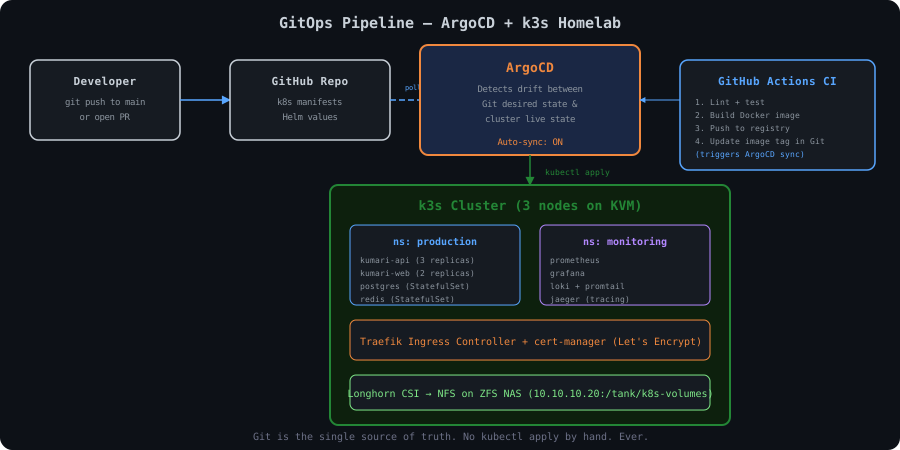
GitOps solves this by inverting the flow. Instead of pushing changes to the cluster, you push changes to Git, and a controller running inside the cluster (ArgoCD, in my case) pulls those changes and applies them. The Git repo becomes the single source of truth. If the cluster state drifts from what's in Git, ArgoCD detects it and either alerts you or auto-corrects it.
The key principles:
- Declarative: The entire system is described in Git
- Versioned: Every change is a Git commit with a message, author, and timestamp
- Automated: Changes are applied by a controller, not a human running kubectl
- Self-healing: If someone manually changes something in the cluster, ArgoCD reverts it
That last point is what sold me. Even if 2 AM Resham runs
kubectl editk3s Cluster Setup on KVM
I already had KVM/QEMU running on my bare metal Arch workstation (I wrote about it in my bare metal workstation post). So spinning up VMs for a Kubernetes cluster was straightforward — but there were decisions to make.
Why k3s and not full k8s? Resource constraints. My workstation has 64GB of RAM, but it's also running Docker Compose stacks, a development environment, and occasionally a browser with too many tabs. I can't dedicate 24GB+ to a proper kubeadm cluster. k3s runs the entire control plane in a single binary, uses SQLite (or etcd with
--cluster-initCreating the VMs
I use
virt-installBash12 lines1# Create the base image first — Ubuntu 22.04 Server 2resham@devbox:~$ virt-install \ 3 --name k3s-base \ 4 --ram 4096 \ 5 --vcpus 2 \ 6 --disk path=/var/lib/libvirt/images/k3s-base.qcow2,size=40 \ 7 --os-variant ubuntu22.04 \ 8 --network bridge=br0 \ 9 --graphics none \ 10 --console pty,target_type=serial \ 11 --cdrom /home/resham/isos/ubuntu-22.04.4-live-server-amd64.iso \ 12 --extra-args 'console=ttyS0'
After installing Ubuntu and configuring SSH keys, I clone the base image for each node:
Bash10 lines1# Clone for 3 nodes 2for i in 1 2 3; do 3 sudo virt-clone \ 4 --original k3s-base \ 5 --name k3s-node-${i} \ 6 --file /var/lib/libvirt/images/k3s-node-${i}.qcow2 7 8 # Start the clone, change hostname 9 sudo virsh start k3s-node-${i} 10done
After booting each clone, I SSH in to set the hostname and static IP:
Bash2 lines1# On each node 2sudo hostnamectl set-hostname k3s-node-1 # 2, 3 respectively
My network layout:
| VM | Hostname | IP | Role |
|---|---|---|---|
| k3s-node-1 | k3s-node-1 | 10.0.50.41 | Server (init) |
| k3s-node-2 | k3s-node-2 | 10.0.50.42 | Server |
| k3s-node-3 | k3s-node-3 | 10.0.50.43 | Server |
All three are servers (control plane + worker). In a homelab, there's no reason to run dedicated agent-only nodes unless you're simulating a production topology. I want HA etcd, so all three participate in the control plane.
Installing k3s
The first node initializes the cluster with embedded etcd:
Bash9 lines1# Node 1 — initialize the cluster 2resham@k3s-node-1:~$ curl -sfL https://get.k3s.io | sh -s - server \ 3 --cluster-init \ 4 --disable traefik \ 5 --disable servicelb \ 6 --write-kubeconfig-mode 644 \ 7 --tls-san 10.0.50.41 \ 8 --tls-san k3s.homelab.local \ 9 --node-taint CriticalAddonsOnly=true:NoExecute
Wait for it to come up, then grab the token:
Bash2 lines1resham@k3s-node-1:~$ sudo cat /var/lib/rancher/k3s/server/node-token 2K10c4b2f3a8e9d::server:abc123xyz789...
Join the other two nodes:
Bash19 lines1# Node 2 2resham@k3s-node-2:~$ curl -sfL https://get.k3s.io | sh -s - server \ 3 --server https://10.0.50.41:6443 \ 4 --token K10c4b2f3a8e9d::server:abc123xyz789... \ 5 --disable traefik \ 6 --disable servicelb \ 7 --write-kubeconfig-mode 644 \ 8 --tls-san 10.0.50.42 \ 9 --tls-san k3s.homelab.local 10 11# Node 3 — same but with 10.0.50.43 12resham@k3s-node-3:~$ curl -sfL https://get.k3s.io | sh -s - server \ 13 --server https://10.0.50.41:6443 \ 14 --token K10c4b2f3a8e9d::server:abc123xyz789... \ 15 --disable traefik \ 16 --disable servicelb \ 17 --write-kubeconfig-mode 644 \ 18 --tls-san 10.0.50.43 \ 19 --tls-san k3s.homelab.local
After a minute, all three should show as Ready:
Bash5 lines1resham@k3s-node-1:~$ kubectl get nodes 2NAME STATUS ROLES AGE VERSION 3k3s-node-1 Ready control-plane,etcd,master 4m v1.29.6+k3s1 4k3s-node-2 Ready control-plane,etcd,master 2m v1.29.6+k3s1 5k3s-node-3 Ready control-plane,etcd,master 90s v1.29.6+k3s1
Copy the kubeconfig to my workstation:
Bash8 lines1resham@devbox:~$ scp resham@10.0.50.41:/etc/rancher/k3s/k3s.yaml ~/.kube/config-k3s 2resham@devbox:~$ sed -i 's/127.0.0.1/10.0.50.41/' ~/.kube/config-k3s 3resham@devbox:~$ export KUBECONFIG=~/.kube/config-k3s 4resham@devbox:~$ kubectl get nodes 5NAME STATUS ROLES AGE VERSION 6k3s-node-1 Ready control-plane,etcd,master 6m v1.29.6+k3s1 7k3s-node-2 Ready control-plane,etcd,master 4m v1.29.6+k3s1 8k3s-node-3 Ready control-plane,etcd,master 3m v1.29.6+k3s1
Cluster is up. Now let's make it impossible to accidentally destroy.
ArgoCD Installation
I install ArgoCD via Helm because I want to manage its own configuration declaratively later (ArgoCD managing itself is a beautiful thing — more on that).
Bash12 lines1resham@devbox:~$ helm repo add argo https://argoproj.github.io/argo-helm 2resham@devbox:~$ helm repo update 3 4resham@devbox:~$ kubectl create namespace argocd 5 6resham@devbox:~$ helm install argocd argo/argo-cd \ 7 --namespace argocd \ 8 --version 6.9.3 \ 9 --set server.service.type=NodePort \ 10 --set server.service.nodePortHttps=30443 \ 11 --set configs.params."server\.insecure"=true \ 12 --set server.extraArgs[0]="--insecure"
Wait for pods to come up:
Bash9 lines1resham@devbox:~$ kubectl -n argocd get pods 2NAME READY STATUS RESTARTS AGE 3argocd-application-controller-0 1/1 Running 0 2m 4argocd-applicationset-controller-6b7b8d5d4-x7q2n 1/1 Running 0 2m 5argocd-dex-server-7c94bc5f8d-m4hzp 1/1 Running 0 2m 6argocd-notifications-controller-5b8dbb7c9f-l9r4v 1/1 Running 0 2m 7argocd-redis-6f8d4bdff5-2kn7x 1/1 Running 0 2m 8argocd-repo-server-7d9b6c8f7-p5t8n 1/1 Running 0 2m 9argocd-server-5f8b7c4d6-k3m9x 1/1 Running 0 2m
Grab the initial admin password:
Bash3 lines1resham@devbox:~$ kubectl -n argocd get secret argocd-initial-admin-secret \ 2 -o jsonpath="{.data.password}" | base64 -d 3# outputs something like: aB3cD4eF5gH6
I can now hit
https://10.0.50.41:30443adminBash3 lines1resham@devbox:~$ argocd login 10.0.50.41:30443 --insecure 2resham@devbox:~$ argocd account update-password 3resham@devbox:~$ kubectl -n argocd delete secret argocd-initial-admin-secret
Connecting to GitHub
ArgoCD needs read access to my Git repository. I create a GitHub fine-grained personal access token with read-only access to the repo, then register it:
Bash3 lines1resham@devbox:~$ argocd repo add https://github.com/iamresham/kumari-k8s-manifests.git \ 2 --username resham \ 3 --password ghp_xxxxxxxxxxxxxxxxxxxxxxxxxxxxxxxxxxxx
Or declaratively (which is what I actually committed):
YAML13 lines1# argocd/repo-secret.yaml 2apiVersion: v1 3kind: Secret 4metadata: 5 name: kumari-k8s-repo 6 namespace: argocd 7 labels: 8 argocd.argoproj.io/secret-type: repository 9stringData: 10 type: git 11 url: https://github.com/iamresham/kumari-k8s-manifests.git 12 username: resham 13 password: <sealed-secret-ref> # More on this later
Repository Structure
This is the part I spent the most time designing. A bad repo layout makes GitOps miserable. Here's what I landed on after two false starts:
Bash59 lines1resham@devbox:~/kumari-k8s-manifests$ tree -L 3 2. 3├── README.md 4├── apps/ # ArgoCD Application CRs 5│ ├── kumari-staging.yaml 6│ ├── kumari-prod.yaml 7│ ├── monitoring.yaml 8│ ├── traefik.yaml 9│ ├── sealed-secrets.yaml 10│ └── longhorn.yaml 11├── base/ # Base manifests (shared) 12│ ├── kumari-backend/ 13│ │ ├── deployment.yaml 14│ │ ├── service.yaml 15│ │ ├── hpa.yaml 16│ │ └── kustomization.yaml 17│ ├── kumari-frontend/ 18│ │ ├── deployment.yaml 19│ │ ├── service.yaml 20│ │ └── kustomization.yaml 21│ ├── postgres/ 22│ │ ├── statefulset.yaml 23│ │ ├── service.yaml 24│ │ ├── pvc.yaml 25│ │ └── kustomization.yaml 26│ └── redis/ 27│ ├── deployment.yaml 28│ ├── service.yaml 29│ └── kustomization.yaml 30├── overlays/ # Environment-specific patches 31│ ├── staging/ 32│ │ ├── kustomization.yaml 33│ │ ├── namespace.yaml 34│ │ ├── ingress.yaml 35│ │ ├── patches/ 36│ │ │ ├── backend-resources.yaml 37│ │ │ ├── backend-env.yaml 38│ │ │ ├── frontend-env.yaml 39│ │ │ ├── postgres-storage.yaml 40│ │ │ └── replica-count.yaml 41│ │ └── secrets/ 42│ │ └── sealed-secrets.yaml 43│ └── production/ 44│ ├── kustomization.yaml 45│ ├── namespace.yaml 46│ ├── ingress.yaml 47│ ├── patches/ 48│ │ ├── backend-resources.yaml 49│ │ ├── backend-env.yaml 50│ │ ├── frontend-env.yaml 51│ │ ├── postgres-storage.yaml 52│ │ └── replica-count.yaml 53│ └── secrets/ 54│ └── sealed-secrets.yaml 55└── helm-values/ # Values files for Helm charts 56 ├── traefik-values.yaml 57 ├── monitoring-values.yaml 58 ├── longhorn-values.yaml 59 └── sealed-secrets-values.yaml
The key insight is the base + overlays pattern from Kustomize. The
base/overlays/Here's the staging Kustomization:
YAML29 lines1# overlays/staging/kustomization.yaml 2apiVersion: kustomize.config.k8s.io/v1beta1 3kind: Kustomization 4 5namespace: kumari-staging 6 7resources: 8 - namespace.yaml 9 - ingress.yaml 10 - secrets/sealed-secrets.yaml 11 - ../../base/kumari-backend 12 - ../../base/kumari-frontend 13 - ../../base/postgres 14 - ../../base/redis 15 16patches: 17 - path: patches/backend-resources.yaml 18 - path: patches/backend-env.yaml 19 - path: patches/frontend-env.yaml 20 - path: patches/postgres-storage.yaml 21 - path: patches/replica-count.yaml 22 23images: 24 - name: kumari-backend 25 newName: ghcr.io/iamresham/kumari-backend 26 newTag: staging-a3f8c2d 27 - name: kumari-frontend 28 newName: ghcr.io/iamresham/kumari-frontend 29 newTag: staging-a3f8c2d
And a resource patch that scales things down for staging:
YAML21 lines1# overlays/staging/patches/replica-count.yaml 2apiVersion: apps/v1 3kind: Deployment 4metadata: 5 name: kumari-backend 6spec: 7 replicas: 1 8--- 9apiVersion: apps/v1 10kind: Deployment 11metadata: 12 name: kumari-frontend 13spec: 14 replicas: 1 15--- 16apiVersion: apps/v1 17kind: Deployment 18metadata: 19 name: redis 20spec: 21 replicas: 1
Production uses the same base but with higher replica counts, more resources, and different image tags. One base, many overlays. Change the base, and all environments pick it up (unless an overlay patches it away).
Deploying Kumari.ai Staging
Now the fun part. Let me walk through the actual manifests for Kumari.ai's staging deployment.
FastAPI Backend
YAML60 lines1# base/kumari-backend/deployment.yaml 2apiVersion: apps/v1 3kind: Deployment 4metadata: 5 name: kumari-backend 6 labels: 7 app: kumari-backend 8 part-of: kumari-ai 9spec: 10 replicas: 2 11 selector: 12 matchLabels: 13 app: kumari-backend 14 template: 15 metadata: 16 labels: 17 app: kumari-backend 18 annotations: 19 prometheus.io/scrape: "true" 20 prometheus.io/port: "8000" 21 prometheus.io/path: "/metrics" 22 spec: 23 containers: 24 - name: backend 25 image: kumari-backend # Overridden by Kustomize images 26 ports: 27 - containerPort: 8000 28 name: http 29 envFrom: 30 - configMapRef: 31 name: kumari-backend-config 32 - secretRef: 33 name: kumari-backend-secrets 34 resources: 35 requests: 36 cpu: 250m 37 memory: 512Mi 38 limits: 39 cpu: "1" 40 memory: 1Gi 41 readinessProbe: 42 httpGet: 43 path: /api/v1/health 44 port: 8000 45 initialDelaySeconds: 10 46 periodSeconds: 5 47 livenessProbe: 48 httpGet: 49 path: /api/v1/health 50 port: 8000 51 initialDelaySeconds: 30 52 periodSeconds: 10 53 startupProbe: 54 httpGet: 55 path: /api/v1/health 56 port: 8000 57 failureThreshold: 30 58 periodSeconds: 2 59 imagePullSecrets: 60 - name: ghcr-pull-secret
The staging resource patch dials things down:
YAML17 lines1# overlays/staging/patches/backend-resources.yaml 2apiVersion: apps/v1 3kind: Deployment 4metadata: 5 name: kumari-backend 6spec: 7 template: 8 spec: 9 containers: 10 - name: backend 11 resources: 12 requests: 13 cpu: 100m 14 memory: 256Mi 15 limits: 16 cpu: 500m 17 memory: 512Mi
PostgreSQL StatefulSet
This one matters because data persistence on k3s can be tricky:
YAML67 lines1# base/postgres/statefulset.yaml 2apiVersion: apps/v1 3kind: StatefulSet 4metadata: 5 name: postgres 6 labels: 7 app: postgres 8 part-of: kumari-ai 9spec: 10 serviceName: postgres 11 replicas: 1 12 selector: 13 matchLabels: 14 app: postgres 15 template: 16 metadata: 17 labels: 18 app: postgres 19 spec: 20 containers: 21 - name: postgres 22 image: postgres:16-alpine 23 ports: 24 - containerPort: 5432 25 name: postgres 26 env: 27 - name: POSTGRES_DB 28 value: kumari 29 - name: POSTGRES_USER 30 valueFrom: 31 secretKeyRef: 32 name: postgres-credentials 33 key: username 34 - name: POSTGRES_PASSWORD 35 valueFrom: 36 secretKeyRef: 37 name: postgres-credentials 38 key: password 39 - name: PGDATA 40 value: /var/lib/postgresql/data/pgdata 41 volumeMounts: 42 - name: postgres-data 43 mountPath: /var/lib/postgresql/data 44 resources: 45 requests: 46 cpu: 250m 47 memory: 512Mi 48 limits: 49 cpu: "1" 50 memory: 1Gi 51 readinessProbe: 52 exec: 53 command: 54 - pg_isready 55 - -U 56 - kumari 57 initialDelaySeconds: 5 58 periodSeconds: 5 59 volumeClaimTemplates: 60 - metadata: 61 name: postgres-data 62 spec: 63 accessModes: ["ReadWriteOnce"] 64 storageClassName: longhorn 65 resources: 66 requests: 67 storage: 10Gi
Redis
Redis is simpler — no persistent storage for the staging cache:
YAML31 lines1# base/redis/deployment.yaml 2apiVersion: apps/v1 3kind: Deployment 4metadata: 5 name: redis 6 labels: 7 app: redis 8 part-of: kumari-ai 9spec: 10 replicas: 1 11 selector: 12 matchLabels: 13 app: redis 14 template: 15 metadata: 16 labels: 17 app: redis 18 spec: 19 containers: 20 - name: redis 21 image: redis:7-alpine 22 ports: 23 - containerPort: 6379 24 command: ["redis-server", "--maxmemory", "128mb", "--maxmemory-policy", "allkeys-lru"] 25 resources: 26 requests: 27 cpu: 50m 28 memory: 64Mi 29 limits: 30 cpu: 200m 31 memory: 192Mi
Ingress with Traefik
Traefik is deployed as a Helm chart managed by ArgoCD. The actual Ingress for Kumari's staging:
YAML33 lines1# overlays/staging/ingress.yaml 2apiVersion: networking.k8s.io/v1 3kind: Ingress 4metadata: 5 name: kumari-staging-ingress 6 annotations: 7 traefik.ingress.kubernetes.io/router.entrypoints: websecure 8 traefik.ingress.kubernetes.io/router.tls: "true" 9 cert-manager.io/cluster-issuer: letsencrypt-staging 10spec: 11 ingressClassName: traefik 12 tls: 13 - hosts: 14 - staging.kumari.homelab.local 15 secretName: kumari-staging-tls 16 rules: 17 - host: staging.kumari.homelab.local 18 http: 19 paths: 20 - path: /api 21 pathType: Prefix 22 backend: 23 service: 24 name: kumari-backend 25 port: 26 number: 8000 27 - path: / 28 pathType: Prefix 29 backend: 30 service: 31 name: kumari-frontend 32 port: 33 number: 3000
The ArgoCD Application CR
This is where everything comes together. This single YAML file tells ArgoCD to watch the Git repo and deploy the staging overlay:
YAML32 lines1# apps/kumari-staging.yaml 2apiVersion: argoproj.io/v1alpha1 3kind: Application 4metadata: 5 name: kumari-staging 6 namespace: argocd 7 finalizers: 8 - resources-finalizer.argocd.argoproj.io 9spec: 10 project: default 11 source: 12 repoURL: https://github.com/iamresham/kumari-k8s-manifests.git 13 targetRevision: main 14 path: overlays/staging 15 destination: 16 server: https://kubernetes.default.svc 17 namespace: kumari-staging 18 syncPolicy: 19 automated: 20 prune: true 21 selfHeal: true 22 allowEmpty: false 23 syncOptions: 24 - CreateNamespace=true 25 - PrunePropagationPolicy=foreground 26 - PruneLast=true 27 retry: 28 limit: 3 29 backoff: 30 duration: 5s 31 factor: 2 32 maxDuration: 3m
Key decisions here:
- — If I remove a manifest from Git, ArgoCD deletes it from the cluster. No orphaned resources.CODE1 line
automated.prune: true - — If someone runsCODE1 line
automated.selfHeal: trueto change something, ArgoCD reverts it within 3 minutes. This is the anti-2-AM-Resham feature.CODE1 linekubectl edit - — When syncing, ArgoCD creates/updates resources before deleting old ones. This prevents downtime during transitions.CODE1 line
PruneLast: true - — Transient failures (API server overloaded, etcd leader election) get automatic retries with exponential backoff.CODE1 line
retry
Apply it:
Bash2 lines1resham@devbox:~$ kubectl apply -f apps/kumari-staging.yaml 2application.argoproj.io/kumari-staging created
Within seconds, ArgoCD clones the repo, runs Kustomize, and starts creating resources. In the ArgoCD UI, I watch the tree of resources turn from yellow (progressing) to green (healthy) one by one. It takes about 90 seconds for everything to come up, mostly waiting for PostgreSQL's readiness probe.
Bash12 lines1resham@devbox:~$ kubectl -n kumari-staging get all 2NAME READY STATUS RESTARTS AGE 3pod/kumari-backend-7d8f9c6b5-x4k2n 1/1 Running 0 2m 4pod/kumari-frontend-5c4d8f7a9-m3p7q 1/1 Running 0 2m 5pod/postgres-0 1/1 Running 0 2m 6pod/redis-6f8d4bdff5-r2t9x 1/1 Running 0 2m 7 8NAME TYPE CLUSTER-IP EXTERNAL-IP PORT(S) 9service/kumari-backend ClusterIP 10.43.128.45 <none> 8000/TCP 10service/kumari-frontend ClusterIP 10.43.201.12 <none> 3000/TCP 11service/postgres ClusterIP 10.43.89.201 <none> 5432/TCP 12service/redis ClusterIP 10.43.156.78 <none> 6379/TCP
Every single one of these resources is tracked in Git. If I delete the namespace now, I just wait 3 minutes and ArgoCD recreates everything. No panic. No scrambling through backup files.
Monitoring with Prometheus + Grafana
The monitoring stack is deployed the same way — an ArgoCD Application pointing at a Helm chart with my custom values:
YAML78 lines1# apps/monitoring.yaml 2apiVersion: argoproj.io/v1alpha1 3kind: Application 4metadata: 5 name: monitoring 6 namespace: argocd 7spec: 8 project: default 9 source: 10 repoURL: https://prometheus-community.github.io/helm-charts 11 chart: kube-prometheus-stack 12 targetRevision: 58.2.2 13 helm: 14 valuesObject: 15 prometheus: 16 prometheusSpec: 17 retention: 15d 18 storageSpec: 19 volumeClaimTemplate: 20 spec: 21 storageClassName: longhorn 22 accessModes: ["ReadWriteOnce"] 23 resources: 24 requests: 25 storage: 20Gi 26 resources: 27 requests: 28 cpu: 200m 29 memory: 512Mi 30 limits: 31 cpu: "1" 32 memory: 2Gi 33 serviceMonitorSelector: {} 34 serviceMonitorNamespaceSelector: {} 35 grafana: 36 adminPassword: <from-sealed-secret> 37 persistence: 38 enabled: true 39 storageClassName: longhorn 40 size: 5Gi 41 dashboardProviders: 42 dashboardproviders.yaml: 43 apiVersion: 1 44 providers: 45 - name: 'default' 46 folder: '' 47 type: file 48 options: 49 path: /var/lib/grafana/dashboards/default 50 dashboards: 51 default: 52 kubernetes-cluster: 53 gnetId: 7249 54 revision: 1 55 datasource: Prometheus 56 argocd: 57 gnetId: 14584 58 revision: 1 59 datasource: Prometheus 60 alertmanager: 61 alertmanagerSpec: 62 resources: 63 requests: 64 cpu: 50m 65 memory: 64Mi 66 limits: 67 cpu: 200m 68 memory: 256Mi 69 destination: 70 server: https://kubernetes.default.svc 71 namespace: monitoring 72 syncPolicy: 73 automated: 74 prune: true 75 selfHeal: true 76 syncOptions: 77 - CreateNamespace=true 78 - ServerSideApply=true
The
serviceMonitorSelector: {}serviceMonitorNamespaceSelector: {}I added a Grafana dashboard (ID 14584) specifically for ArgoCD metrics — it shows sync duration, sync failures, app health status, and repo server latency. Being able to see when ArgoCD is struggling to sync is critical for debugging.
The Sync Loop
Here's what the actual workflow looks like now:
CODE25 lines1Developer pushes commit 2 │ 3 ▼ 4GitHub repository updated 5 │ 6 ▼ 7ArgoCD polls repo (every 3 minutes by default) 8 │ 9 ▼ 10ArgoCD detects diff between desired state (Git) and live state (cluster) 11 │ 12 ▼ 13ArgoCD runs Kustomize build / Helm template 14 │ 15 ▼ 16ArgoCD applies manifests to cluster 17 │ 18 ▼ 19Kubernetes reconciles (creates/updates/deletes resources) 20 │ 21 ▼ 22ArgoCD verifies health checks pass 23 │ 24 ▼ 25Application status: Synced + Healthy ✓
In practice, a typical change — say, updating the backend image tag — looks like this:
Bash7 lines1# On my workstation, update the image tag in the staging overlay 2resham@devbox:~/kumari-k8s-manifests$ vim overlays/staging/kustomization.yaml 3# Change: newTag: staging-a3f8c2d → newTag: staging-b7e1d4f 4 5resham@devbox:~/kumari-k8s-manifests$ git add overlays/staging/kustomization.yaml 6resham@devbox:~/kumari-k8s-manifests$ git commit -m "feat: bump backend to staging-b7e1d4f (add websocket auth)" 7resham@devbox:~/kumari-k8s-manifests$ git push
Within 3 minutes (or immediately if I click "Refresh" in the ArgoCD UI), the new image rolls out. ArgoCD creates a new ReplicaSet, waits for the new pods to pass readiness probes, then scales down the old ReplicaSet. Standard Kubernetes rolling update, but triggered by a Git push instead of a manual
kubectl set imageIf the new image is broken — say the readiness probe fails — the rollout stalls. The old pods keep serving traffic. I see the failure in ArgoCD's UI, revert the Git commit, push, and ArgoCD rolls back. The entire incident response is:
Bash2 lines1resham@devbox:~/kumari-k8s-manifests$ git revert HEAD 2resham@devbox:~/kumari-k8s-manifests$ git push
Two commands. No
kubectl rollout undoSecrets Management
This is the part of GitOps that everyone warns you about, and they're right to. You can't just commit Kubernetes Secrets to Git in plaintext. But you also can't have ArgoCD manage your deployments if the Secrets live outside of Git. The whole point is Git as the single source of truth.
I use Sealed Secrets from Bitnami. The architecture is straightforward:
- A controller runs in the cluster and holds a private key
- I encrypt Secrets on my workstation using the controller's public key
- The encrypted SealedSecret resource is committed to Git
- ArgoCD applies the SealedSecret to the cluster
- The controller decrypts it into a regular Kubernetes Secret
Bash7 lines1# Install kubeseal CLI 2resham@devbox:~$ wget https://github.com/bitnami-labs/sealed-secrets/releases/download/v0.26.2/kubeseal-0.26.2-linux-amd64.tar.gz 3resham@devbox:~$ tar xzf kubeseal-0.26.2-linux-amd64.tar.gz 4resham@devbox:~$ sudo mv kubeseal /usr/local/bin/ 5 6# Fetch the public key from the cluster 7resham@devbox:~$ kubeseal --fetch-cert > sealed-secrets-pub.pem
Creating a sealed secret:
Bash10 lines1# Start with a regular Secret (never commit this) 2resham@devbox:~$ kubectl create secret generic kumari-backend-secrets \ 3 --namespace kumari-staging \ 4 --from-literal=DATABASE_URL='postgresql://kumari:s3cretP4ss@postgres:5432/kumari' \ 5 --from-literal=REDIS_URL='redis://redis:6379/0' \ 6 --from-literal=OPENAI_API_KEY='sk-proj-...' \ 7 --from-literal=JWT_SECRET='ultra-secret-jwt-key-here' \ 8 --dry-run=client -o yaml | \ 9 kubeseal --cert sealed-secrets-pub.pem -o yaml \ 10 > overlays/staging/secrets/sealed-secrets.yaml
The resulting SealedSecret looks like this (encrypted values are truncated):
YAML17 lines1# overlays/staging/secrets/sealed-secrets.yaml 2apiVersion: bitnami.com/v1alpha1 3kind: SealedSecret 4metadata: 5 name: kumari-backend-secrets 6 namespace: kumari-staging 7spec: 8 encryptedData: 9 DATABASE_URL: AgBx7c2K9f... # ~200 chars of encrypted base64 10 REDIS_URL: AgDp3m8R4a... 11 OPENAI_API_KEY: AgFw5n1T7e... 12 JWT_SECRET: AgHy2p4V0i... 13 template: 14 metadata: 15 name: kumari-backend-secrets 16 namespace: kumari-staging 17 type: Opaque
This is safe to commit to Git. Only the Sealed Secrets controller in the cluster can decrypt it. If someone clones my repo, they see encrypted blobs.
The source of truth for the actual secret values is an Ansible Vault file on my workstation. When I need to rotate a secret, I update the Vault, regenerate the SealedSecret, commit, and push. ArgoCD does the rest.
Bash11 lines1# My secret rotation workflow 2resham@devbox:~$ ansible-vault edit secrets/kumari-staging.vault.yml 3# Edit the value 4 5resham@devbox:~$ ./scripts/generate-sealed-secrets.sh staging 6# Script reads from vault, creates sealed secret YAML 7 8resham@devbox:~$ cd ~/kumari-k8s-manifests 9resham@devbox:~/kumari-k8s-manifests$ git add overlays/staging/secrets/ 10resham@devbox:~/kumari-k8s-manifests$ git commit -m "chore: rotate staging DB credentials" 11resham@devbox:~/kumari-k8s-manifests$ git push
What Broke
Every homelab blog post that doesn't include a "what went wrong" section is lying. Here's what bit me.
1. ArgoCD Sync Stuck on Immutable Fields
The first time I tried to change the
storageClassNameCODE4 lines1ComparisonError: failed to sync: The StatefulSet "postgres" is invalid: 2spec: Forbidden: updates to statefulset spec for fields other than 3'replicas', 'ordinals', 'template', 'updateStrategy', 'persistentVolumeClaimRetentionPolicy' 4and 'minReadySeconds' are forbidden
Kubernetes StatefulSet
volumeClaimTemplates- Back up the data (I used into a temporary pod)CODE1 line
pg_dump - Delete the StatefulSet and its PVCs in Git (commit + push, let ArgoCD prune)
- Update the volumeClaimTemplate with the new storage class
- Commit and push (ArgoCD recreates everything fresh)
- Restore the data from backup
2. CrashLoopBackoff from a Bad Image Tag
I pushed a commit with a typo in the image tag:
staging-b7e1d4staging-b7e1d4fErrImagePullImagePullBackOffCrashLoopBackoffThe fix was simple (
git revertYAML20 lines1# .github/workflows/validate-image-tags.yml 2name: Validate Image Tags 3on: 4 pull_request: 5 paths: 6 - 'overlays/**/kustomization.yaml' 7jobs: 8 validate: 9 runs-on: ubuntu-latest 10 steps: 11 - uses: actions/checkout@v4 12 - name: Extract image tags 13 run: | 14 grep "newTag:" overlays/*/kustomization.yaml | while read line; do 15 TAG=$(echo "$line" | awk '{print $2}') 16 IMAGE=$(grep -B1 "newTag: $TAG" overlays/*/kustomization.yaml | grep "newName:" | awk '{print $2}') 17 echo "Checking $IMAGE:$TAG" 18 docker manifest inspect "$IMAGE:$TAG" > /dev/null 2>&1 || \ 19 (echo "ERROR: $IMAGE:$TAG does not exist" && exit 1) 20 done
3. Longhorn PVC Binding Issues
I chose Longhorn as the storage backend because it's designed for Kubernetes on commodity hardware — exactly my situation with KVM VMs. But the initial setup had a frustrating issue: PVCs were stuck in
PendingBash3 lines1resham@devbox:~$ kubectl get pvc -n kumari-staging 2NAME STATUS VOLUME CAPACITY ACCESS MODES 3postgres-data-postgres-0 Pending
The
kubectl describe pvcCODE4 lines1Events: 2 Type Reason Age From Message 3 ---- ------ ---- ---- ------- 4 Warning ProvisioningFailed 30s longhorn-provisioner waiting for a volume to be created
Digging into the Longhorn manager logs, the real issue was that my VM disks were using
virtio-scsivirtio-blkBash5 lines1resham@devbox:~$ sudo virsh edit k3s-node-1 2# Change: <target dev='sda' bus='scsi'/> 3# To: <target dev='vda' bus='virtio'/> 4 5resham@devbox:~$ sudo virsh destroy k3s-node-1 && sudo virsh start k3s-node-1
After the nodes came back, Longhorn detected the disks and PVCs bound within seconds.
4. ArgoCD App-of-Apps Bootstrap Loop
I wanted ArgoCD to manage all Applications, including the Application CRs themselves. This is the "app of apps" pattern. I created a root Application that points to the
apps/YAML19 lines1# apps/root.yaml 2apiVersion: argoproj.io/v1alpha1 3kind: Application 4metadata: 5 name: root 6 namespace: argocd 7spec: 8 project: default 9 source: 10 repoURL: https://github.com/iamresham/kumari-k8s-manifests.git 11 targetRevision: main 12 path: apps 13 destination: 14 server: https://kubernetes.default.svc 15 namespace: argocd 16 syncPolicy: 17 automated: 18 prune: true 19 selfHeal: true
The problem: the
rootapps/The fix: move
root.yamlbootstrap/apps/kubectl apply -f bootstrap/root.yamlapps/apps/Results
After three weeks of running this setup, here's the before/after:
| Metric | Before (kubectl) | After (ArgoCD + GitOps) |
|---|---|---|
| Time to deploy a new image | 2-5 min (find YAML, edit, apply, verify) | 30 sec (edit tag, commit, push) |
| Time to rollback | 5-15 min (find old YAML, hope it's current, apply) | 10 sec ( CODE 1 line git revert HEAD && git push |
| Configuration drift | Constant, undetectable | Zero (self-heal reverts manual changes) |
| Disaster recovery | Hours (reconstruct from memory and backups) | 3 min (ArgoCD recreates from Git) |
| Audit trail | None | Full Git history with diffs, authors, timestamps |
| Sleep quality | Poor | Significantly improved |
That last row isn't a joke. Knowing that the cluster state is in Git and can be reconstructed from scratch changed my relationship with the homelab. I'm no longer afraid to experiment because I can always go back.
What's Next
The setup is solid for staging, but there are things I want to improve:
-
GitHub webhook instead of polling — 3-minute sync interval is fine, but I want instant deploys. ArgoCD supports webhooks; I just need to expose it through Traefik with proper auth.
-
ArgoCD Image Updater — Instead of manually updating image tags in the Kustomization file, the Image Updater can watch GHCR for new tags matching a pattern and automatically commit the update. Full hands-off CI/CD.
-
Production environment — Right now only staging runs on k3s. Production is still Docker Compose on the R720. Moving it to the cluster is the next project — but it means solving persistent storage for real, not just for staging data I can afford to lose.
-
ArgoCD notifications — I want Slack (well, Discord) alerts when a sync fails or an app goes unhealthy. The ArgoCD Notifications controller supports this out of the box.
The broader point is this: GitOps isn't just for companies with SRE teams and production Kubernetes clusters. It's arguably even more valuable in a homelab, where you're the only operator, changes happen at odd hours, and there's no one to bail you out when you delete the wrong namespace at 2 AM.
git revert